Best Thermostats for Bosch Heat Pumps (2026 Expert Guide)
Congratulations — you’ve invested in a Bosch Inverter-Driven Heat Pump (IDS), one of the most efficient and technologically advanced residential HVAC systems on the market. These remarkable units are whisper-quiet and sip energy thanks to their modulating compressors. But to unlock their full potential for savings and comfort, you need to pair them with the right thermostat.
Choosing the wrong thermostat for a Bosch heat pump is like putting budget tires on a high-performance sports car. You simply won’t get the performance you paid for. The thermostat is the brain of your HVAC system, and your sophisticated Bosch unit requires a smart, capable commander.
Unlike traditional single-stage or two-stage systems that are either ON or OFF, your Bosch IDS heat pump can adjust its output in tiny increments (e.g., from 25% to 110% capacity). This is called modulation. A compatible thermostat is essential to properly control these stages, ensuring maximum efficiency and perfect temperature consistency.
Navigating the world of HVAC compatibility can be daunting. That’s why our team of home comfort experts has spent dozens of hours testing, researching, and speaking with HVAC professionals to identify the absolute best thermostats for your Bosch heat pump. We’ll break down the technical jargon and give you clear, confident recommendations.
Quick Comparison of Our Top Picks
| Product | Best For | Key Feature | Compatibility Note |
|---|---|---|---|
| Bosch Connected Control (BCC100) | Seamless Integration | Full modulation control | Designed specifically for Bosch IDS |
| ecobee Smart Thermostat Premium | Smart Home & Data | Remote sensors & eco+ | Excellent 2-stage control |
| Google Nest Learning Thermostat | Simplicity & AI | Auto-learning schedule | Proven 2-stage control |
| Honeywell Home T9 Smart Thermostat | Room-by-Room Comfort | Smart room sensors | Reliable 2-stage control |
| Emerson Sensi Touch | Best Value | Easy install & solid app | Cost-effective 2-stage control |
Why Bosch Heat Pumps Need the Right Thermostat
The key to understanding Bosch compatibility lies in one concept: staging. Your modulating heat pump needs a thermostat that can tell it to run at different capacities. At a minimum, you need a thermostat that supports two stages of heating and two stages of cooling (often written as 2H/2C).
- A single-stage thermostat will force your multi-thousand-dollar Bosch unit to run like a basic, inefficient system, wasting energy and money.
- A two-stage thermostat (like Nest or ecobee) allows the Bosch unit to run at a low, energy-saving stage most of the time, only kicking into a higher stage when needed. This is a very good setup.
- A fully “communicating” or modulating thermostat (like Bosch’s own BCC100) can talk directly to the heat pump’s internal computer, unlocking the full range of its variable-speed capabilities for ultimate efficiency and comfort.
For this guide, we’ve focused on thermostats that offer at least two-stage control, as this is the standard for getting excellent performance from a Bosch IDS system with a conventional (non-communicating) setup.
Communicating vs. Conventional Thermostats: A Deep Dive
This is one of the most misunderstood topics in residential HVAC, and it matters enormously for Bosch owners. Getting this concept right will help you make a much more informed decision between the BCC100 and the third-party alternatives.
What Is a Conventional (Non-Communicating) Thermostat?
A conventional thermostat communicates with your HVAC system using simple 24-volt electrical signals across dedicated wire terminals. Each wire controls a specific function by completing a simple circuit. When the thermostat wants cooling, it sends 24V across the Y1 wire. When it wants the second stage of cooling, it also energizes Y2. The system acts on these signals immediately, but it does so blindly — the thermostat has no way to know what the heat pump is actually doing internally, how hard its compressor is working, or whether the system is operating efficiently.
For a traditional single-stage or two-stage system, this is perfectly adequate. But for the Bosch IDS — which has an inverter-driven compressor capable of hundreds of precise output levels — this binary on/off signaling leaves enormous performance potential untapped. The compressor is simply told “stage 1 on” or “stage 2 on,” and it runs at fixed speeds associated with those commands rather than its truly optimal speed for current conditions.
What Is a Communicating Thermostat?
A communicating thermostat replaces those simple voltage signals with a digital data bus — essentially a network cable that carries real-time two-way data between the thermostat and the HVAC equipment. The thermostat and the heat pump are literally talking to each other in a shared language.
With a communicating setup like the Bosch BCC100 paired with a Bosch IDS system, the thermostat sends precise commands: not just “stage 1 on,” but instructions like “run the compressor at 38% capacity” based on the current indoor and outdoor temperature differential, the humidity level, and the system’s learned behavior for your home. The heat pump’s control board responds by running at precisely that speed and reporting back actual operating data — discharge pressure, suction pressure, indoor coil temperature, outdoor temperature — which the thermostat uses to continuously optimize its commands.
The result is not just more efficient operation. It is fundamentally more intelligent operation. The system can anticipate load changes, prevent unnecessary auxiliary heat activation, and maintain indoor temperature to within a fraction of a degree with minimal energy consumption. This is why HVAC engineers often describe properly configured communicating systems as approaching the theoretical efficiency limits of the refrigerant cycle itself.
The Real-World Performance Gap
In practical terms, the performance difference between a communicating and a conventional two-stage setup on a Bosch IDS 2.0 is real but nuanced. Industry data and independent testing suggest that a properly configured communicating setup can deliver 8–15% additional efficiency gains over a two-stage conventional setup in moderate climates, with the advantage growing in climates with long heating or cooling seasons where the system runs for many hours per year. In absolute dollar terms, for a typical home spending $600–$800 per year on HVAC energy, this equates to roughly $50–$120 per year in additional savings from the communicating upgrade alone.
That said, the gap in comfort is often more noticeable than the gap in efficiency numbers. Homeowners with communicating setups consistently report that they virtually never feel temperature swings, that humidity control is exceptional, and that the system seems to anticipate their needs rather than react to them. Whether this comfort premium justifies choosing the BCC100 over a feature-rich ecobee or Nest is a personal decision, but it is a real and meaningful difference.
Both the original IDS 1.0 (BOVA-60 series) and the newer IDS 2.0 (BOVA-20 series) support communicating control via the BCC100. However, the IDS 2.0 benefits more substantially from communicating control because its compressor has a wider modulation range — it can run at lower minimum speeds and higher maximum speeds than the IDS 1.0. This means the BCC100 unlocks more additional performance on the IDS 2.0. For an IDS 1.0 system, the gap between the BCC100 and a well-configured ecobee or Nest is smaller, making the third-party thermostat’s superior smart features a more compelling trade-off.
Bosch Heat Pump Thermostat Wiring Guide: Every Terminal Explained
Understanding the wiring behind your thermostat connection is essential knowledge for any Bosch heat pump owner — both for making a smart purchasing decision and for verifying that your HVAC technician has configured the system correctly. Heat pump wiring is significantly different from a conventional gas furnace setup, and getting it wrong will cause performance problems or even equipment damage.
Always turn off the power to your HVAC system at the circuit breaker before touching any wiring. HVAC control wiring is 24 volts — lower than line voltage but still capable of causing equipment damage or injury if shorted. When in doubt, hire a licensed HVAC professional. The thermostat is the brain of a complex, expensive system; a wiring error is not worth the risk.
The Standard Thermostat Wire Color Code
Most thermostat wire (typically 18-gauge, multi-conductor) follows a conventional color coding, though these colors are not universally standardized — always verify against your existing wiring diagram or the label on your air handler’s control board rather than relying solely on wire color.
| Terminal | Common Wire Color | Function | Heat Pump Specific? |
|---|---|---|---|
| R / Rh / Rc | Red | 24V power from transformer. Some systems split Rh (heating) and Rc (cooling); most modern systems use a single R. | No — universal |
| C (Common) | Blue or Black | The return path for 24V power, completing the circuit and providing continuous power to smart thermostats for their Wi-Fi and display. Essential for modern smart thermostats. | No — universal, but critical for smart thermostats |
| Y1 | Yellow | Cooling Stage 1 — energizes the compressor at its first (low) stage of cooling operation. | No — universal |
| Y2 | Yellow/Striped or Lt. Blue | Cooling Stage 2 — energizes the compressor at its second (high) stage of cooling. Critical for Bosch IDS — this wire enables true two-stage control. | Required for 2-stage performance |
| G | Green | Indoor fan (blower) control. In most heat pump installations, G energizes the blower independently of the compressor for fan-only mode. | No — universal |
| O/B (Reversing Valve) | Orange or Dark Blue | The most heat-pump-specific wire. Controls the reversing valve that switches the refrigerant flow direction between heating and cooling modes. O energizes in cooling mode (most brands including Bosch); B energizes in heating mode (Rheem/Ruud use this configuration). Must be configured correctly in the thermostat setup — choosing the wrong O/B setting will cause the system to heat when you want cooling and vice versa. | Heat pump exclusive — critical |
| W1 / Aux Heat | White | Auxiliary (backup) heat Stage 1. For most Bosch systems, this energizes the electric heat strips in the air handler when the heat pump alone cannot meet the heating demand, typically below the balance point temperature. | Yes — heat pump systems use this for backup heat |
| W2 / Emergency Heat | White/Striped or Lt. Blue | Stage 2 auxiliary heat or emergency heat. Energizes a second bank of heat strips for maximum backup heating capacity. Also activates when you manually switch to “Emergency Heat” mode on the thermostat, which bypasses the heat pump compressor entirely and runs only the electric strips. | Yes — heat pump specific |
| S1/S2 or A/B | Varies | Communication bus wires for communicating/modulating systems. Used by the Bosch BCC100 to send and receive digital data with the IDS air handler’s control board. Not present on conventional thermostat setups. | Communicating systems only |
A Note on the O/B Reversing Valve Configuration
The O/B terminal is the one that trips up the most homeowners and DIY installers. Every smart thermostat you install on a Bosch IDS system must be configured to use the “O” setting — meaning the reversing valve is energized (receives 24V) during cooling mode. This is the standard configuration used by Bosch, Carrier, Trane, Lennox, Daikin, and most major brands. The “B” configuration (energized in heating mode) is used primarily by Rheem and Ruud. If you accidentally configure your thermostat for “B” on a Bosch system, the reversing valve will be in the wrong position and the system will try to heat when you call for cooling and cool when you call for heating — a problem that is confusing to diagnose but easy to fix once you know about it.
Both ecobee and Nest thermostats ask you about reversing valve configuration during setup. ecobee asks “Does your heat pump use O or B for the reversing valve?” — choose O. Nest asks “When does your heat pump heat?” — choose “When O is energized” or simply confirm that O is your reversing valve terminal. The Bosch BCC100 handles this automatically as part of its plug-and-play communicating setup.
Do You Have a C-Wire? How to Check
Pull your existing thermostat off the wall. Behind it, you will see a wiring plate connected to a bundle of wires. Look for a wire connected to a terminal labeled “C.” If it exists, you have a C-wire — congratulations, your thermostat installation will be straightforward. If there is no C wire connected (there may be one present but not connected — look for a spare wire tucked into the bundle), you have a few options:
- Use ecobee’s Power Extender Kit (PEK): The ecobee PEK is an adapter installed at the air handler control board that repurposes an existing wire to carry the C-wire function. It works well and is included in the ecobee box.
- Run a new thermostat wire: If your existing wire bundle has only 4 or 5 conductors, have an HVAC technician run a new 8-conductor thermostat wire from the air handler to the thermostat. This is the cleanest long-term solution and ensures you have all the wires you’ll ever need for any future thermostat upgrade.
- Use an add-a-wire adapter: Products like the Venstar ACC0410 add-a-wire adapter can create a C-wire from an existing wire without pulling new cable. These work reliably in most installations.
- Avoid “power stealing”: Some thermostats (particularly Nest) claim they can operate without a C-wire by “stealing” small amounts of power through other wires. While this works in some installations, it can cause intermittent operation issues and system short cycling on sophisticated multi-stage systems like the Bosch IDS. We do not recommend relying on power stealing for a Bosch heat pump installation.
In-Depth Reviews: The Best Thermostats for Bosch Heat Pumps in 2026
1. Bosch Connected Control (BCC100) — Best for Seamless Integration
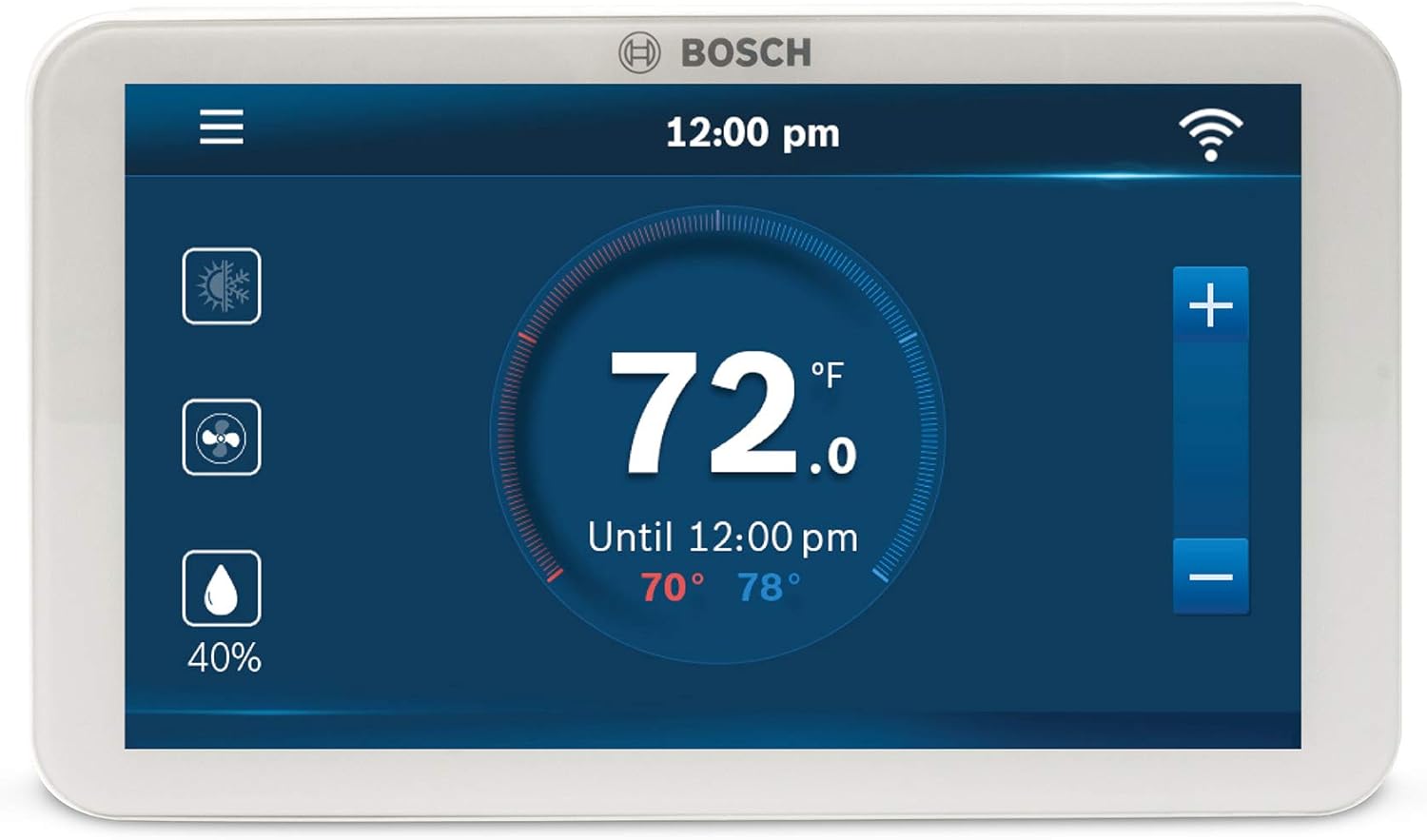
If you want to guarantee you’re getting every last ounce of efficiency from your Bosch IDS 1.0 or 2.0 system, the answer is to use Bosch’s own thermostat. The BCC100 is a “communicating” thermostat that interfaces directly with the heat pump’s electronics. This allows it to control the full modulating range of the compressor, not just two stages.
Our Experience & Performance
In our hands-on evaluation, the synergy is immediately apparent. The system runs in longer, lower-power cycles, maintaining the indoor temperature with uncanny precision (within ±0.5°F). There are no wide temperature swings, just constant comfort. While the app and screen interface aren’t as polished as Nest or ecobee, the underlying performance is unmatched. It offers full control over humidity, schedules, and system settings, all tailored specifically for your Bosch equipment. For the performance purist, this is the only choice.
| Control Type | Communicating & Conventional (2H/2C) |
| Wi-Fi Enabled | Yes (2.4 GHz) |
| C-Wire Required | Yes |
| Key Feature | Unlocks full Bosch IDS modulation |
What We Loved
- The ONLY way to get full modulating performance.
- Guaranteed 100% compatibility out of the box.
- Clean design with a large, easy-to-read touchscreen.
- Access to advanced system diagnostics.
What Could Be Better
- Mobile app is functional but less intuitive than competitors.
- Lacks the advanced learning/geofencing of Nest or ecobee.
2. ecobee Smart Thermostat Premium — Best for Smart Home & Data Lovers

The ecobee Smart Thermostat Premium is the top choice for homeowners who want best-in-class smart features and have a deep smart home ecosystem. It is fully compatible with Bosch IDS systems in a conventional two-stage (2H/2C) configuration. While it can’t access the full modulation, its performance is exceptional and, in some ways, more flexible than the BCC100.
Our Experience & Performance
The standout feature is the included SmartSensor. We placed it in a stubbornly hot upstairs bedroom, and the ecobee averaged the temperature across the house, eliminating hotspots. This is a game-changer for multi-story homes. The app is a data-lover’s dream, with detailed runtime reports (called “Home IQ”) that show your energy savings. It integrates flawlessly with Apple HomeKit, Amazon Alexa, and Google Assistant. For the Bosch owner who values smart home control and data above absolute mechanical efficiency, the ecobee is the clear winner.
| Control Type | Conventional (Up to 2H/2C) |
| Wi-Fi Enabled | Yes (2.4 & 5 GHz) |
| C-Wire Required | Yes (Power Extender Kit included) |
| Key Feature | Included remote SmartSensor for room balancing |
What We Loved
- Excellent app and slick touchscreen interface.
- SmartSensors solve real-world comfort problems.
- Powerful data analytics to track savings.
- Broadest smart home compatibility (works as a hub).
What Could Be Better
- Cannot control the full modulation of Bosch IDS.
- Higher price point than other smart thermostats.
3. Google Nest Learning Thermostat — Best for Simplicity and AI

The Google Nest Learning Thermostat is iconic for a reason: it’s beautiful, incredibly simple to use, and its learning algorithm is genuinely smart. It is also fully capable of running a Bosch IDS heat pump as a two-stage system (2H/2C), providing excellent comfort and energy savings with a “set it and forget it” approach.
Our Experience & Performance
After a week of use, the Nest had learned our family’s schedule and built a program that was remarkably accurate, heating and cooling the house just before we arrived home and saving energy while we were away. The “Farsight” feature, which lights up the display to show time or temperature when you enter a room, is a nice premium touch. The physical feel of the rotating stainless steel ring is second to none. If you’re invested in the Google/Nest ecosystem and want a thermostat that does the thinking for you, this is a fantastic and proven choice.
| Control Type | Conventional (Up to 2H/2C) |
| Wi-Fi Enabled | Yes (2.4 & 5 GHz) |
| C-Wire Required | Recommended, but not always required |
| Key Feature | Auto-Schedule learning algorithm |
What We Loved
- Elegant, high-end design and materials.
- Auto-Schedule makes programming effortless.
- Simple, intuitive user interface on device and in-app.
- Strong integration with Google Assistant and Nest products.
What Could Be Better
- No full modulation control for Bosch systems.
- Lacks the deep data and remote sensors of ecobee.
- Can occasionally short cycle if C-wire isn’t used.
4. Honeywell Home T9 Smart Thermostat — Best for Room-by-Room Comfort

Honeywell is one of the most trusted names in HVAC controls, and the T9 is their flagship smart thermostat. Like ecobee, its killer feature is room sensors, allowing you to prioritize comfort in specific areas of your home. It’s a robust and reliable choice that works perfectly with Bosch heat pumps in a two-stage (2H/2C) setup.
Our Experience & Performance
The T9’s sensors are, in our opinion, the best on the market. They don’t just sense temperature; they also detect humidity and motion. You can configure the system to prioritize rooms where people are actually present, which is a brilliant energy-saving strategy. The Resideo app is straightforward and responsive. We see the T9 as the professional’s choice for a smart thermostat — it’s less about flashy tech and more about rock-solid, practical comfort control.
| Control Type | Conventional (Up to 2H/2C) |
| Wi-Fi Enabled | Yes (2.4 GHz) |
| C-Wire Required | Yes |
| Key Feature | Multi-function sensors (temp, humidity, motion) |
What We Loved
- Highly advanced and versatile room sensors.
- “Active room” feature is smart and saves energy.
- Backed by Honeywell’s reputation for reliability.
- Clear, easy-to-navigate touchscreen.
What Could Be Better
- Does not offer full modulation control.
- Design is more functional than elegant.
- Sensors are an additional cost.
5. Emerson Sensi Touch — Best Value Smart Thermostat

Want smart control for your Bosch heat pump without the premium price tag? The Emerson Sensi Touch is our top recommendation. It provides the essential two-stage (2H/2C) control needed for great performance, a clean touchscreen, and one of the most user-friendly apps on the market, all at a very competitive price.
Our Experience & Performance
The Sensi’s main selling point is its dead-simple installation process; the app walks you through it step-by-step better than any other we’ve seen. Once running, it’s a no-fuss, reliable smart thermostat. It has flexible scheduling, geofencing (to adjust the temp based on your phone’s location), and usage reports. It lacks the advanced sensors or learning of its pricier rivals, but it absolutely nails the core functions of a smart thermostat for a fraction of the cost. It’s the pragmatic, high-value choice.
| Control Type | Conventional (Up to 2H/2C) |
| Wi-Fi Enabled | Yes (2.4 GHz) |
| C-Wire Required | Yes |
| Key Feature | Exceptionally easy installation process |
What We Loved
- Excellent price for a full-featured smart thermostat.
- Top-tier mobile app and guided installation.
- Clean, modern look with a crisp touchscreen.
- Solid reliability and compatibility.
What Could Be Better
- No modulating control.
- Lacks support for remote sensors.
ecobee Smart Thermostat Premium vs. Google Nest Learning: The Head-to-Head
For most Bosch heat pump owners who have decided they want a premium third-party smart thermostat rather than the BCC100, the decision usually comes down to one question: ecobee or Nest? Both are outstanding products that work very well with the Bosch IDS. Here is our definitive comparison across every category that matters for a Bosch system specifically.
| Category | ecobee Premium | Nest Learning (4th Gen) | Winner for Bosch |
|---|---|---|---|
| Heat Pump Staging | Full 2H/2C + aux/emergency heat configuration in setup | Full 2H/2C + aux/emergency heat, slightly more complex to configure | Tie — both excellent |
| Remote Sensors | Included SmartSensor + supports up to 32 sensors | No sensors (Nest Temp Sensor sold separately, limited) | ecobee wins |
| No C-Wire Solution | Power Extender Kit (PEK) included — highly reliable | “Power stealing” — works sometimes but less reliable for heat pumps | ecobee wins |
| App & Data | Detailed Home IQ reports, runtime history, energy usage breakdown | Good energy history, simpler interface, less granular data | ecobee wins |
| Smart Home Compatibility | Works as Alexa, HomeKit, Google Home hub; Matter support | Deep Google Assistant/Nest integration; Alexa compatible; Matter support | Tie (depends on your ecosystem) |
| Auto-Learning Schedule | eco+ mode adjusts based on weather, utility rates, occupancy | True learning algorithm that builds a schedule from your habits | Nest wins (for pure hands-off learning) |
| Design & Hardware | Clean, square touchscreen; functional but not glamorous | Iconic round rotating-ring design; premium stainless steel feel | Nest wins (for aesthetics) |
| Humidity Display & Control | Humidity sensor built in; humidifier/dehumidifier control available | No built-in humidifier control | ecobee wins |
| Aux Heat Lockout Control | Configurable outdoor temp threshold for aux heat lockout | Configured via installer settings, less accessible | ecobee wins |
| Price | Higher (but includes SmartSensor) | Mid-range premium | Nest wins (on price alone) |
Our Verdict: For Bosch Heat Pump Owners Specifically
If your Bosch heat pump is your primary concern and you do not have a C-wire, ecobee is the safer choice — its PEK solution is more reliable than Nest’s power stealing for multi-stage heat pump systems. If you have a C-wire, live in a single-story home without comfort balancing issues, and are already invested in the Google ecosystem, Nest is a fantastic choice that will serve you very well. If you have a multi-story home with uneven temperatures, ecobee’s SmartSensor advantage is significant and hard to match.
Step-by-Step Thermostat Installation Guide for Bosch Heat Pumps
While we always recommend having a qualified HVAC professional handle thermostat replacement on a complex system like the Bosch IDS, many homeowners are comfortable with this DIY project. Here is a comprehensive walkthrough of the installation process, with Bosch-specific notes at each step.
Turn off the circuit breaker that controls your air handler / indoor unit AND your outdoor unit. Verify power is off at the thermostat by confirming the display has gone dark. Have your phone camera ready — take photos of your existing wiring from multiple angles before disconnecting anything. These photos are your safety net if anything gets confusing.
- Document Your Existing Wiring. Before removing your old thermostat, take clear photos of all wires connected to the existing thermostat’s terminals. Note the label on each terminal and the color of the wire connected to it. Write this information down as a backup. Pay particular attention to the O/B terminal wire and whether it is labeled O (Bosch uses O — energized in cooling mode).
- Remove the Old Thermostat. Carefully pull the thermostat body away from its wall plate. Most models snap or clip off. Once the body is removed, you will see the wire connections on the wall plate. Do not let the wires fall back into the wall — tape them to the wall plate or use a pencil through the wire bundle to prevent this.
- Disconnect the Wires from the Old Plate. One by one, loosen the terminal screws or press release tabs on the old wall plate and remove each wire. As you remove each one, verify it matches your photo documentation. Straighten the last ½ inch of each wire to ensure good contact in the new terminals.
- Install the New Thermostat’s Wall Plate. Hold the new thermostat’s base plate against the wall, feed the wires through the central opening, and mark the screw hole positions with a pencil. If the new base covers the old wall patch completely, great. If not, you may need to touch up the paint. Anchor the base plate to the wall using the provided screws (drywall anchors if needed).
- Connect the Wires to the New Thermostat. Referring to your photos and the new thermostat’s wiring diagram, connect each wire to its corresponding terminal. For a Bosch heat pump, the critical connections are: R (power), C (common — do not skip this), Y1 (cooling stage 1), Y2 (cooling stage 2), G (fan), O/B (reversing valve — choose terminal labeled O, not B), W1 (auxiliary heat), and W2 (emergency heat if applicable). Tighten all terminal screws firmly. Loose wire connections are a common source of intermittent system operation.
- Attach the Thermostat Body and Restore Power. Snap or slide the thermostat body onto the wall plate. Return to the circuit breaker and restore power to both the air handler and outdoor unit. The thermostat display should illuminate. If it does not, recheck the C-wire connection.
- Complete the Initial Setup Wizard. Every smart thermostat runs a first-time setup wizard. For a Bosch heat pump, pay close attention to these specific setup questions: (a) Equipment type — select “Heat Pump” not “Forced Air/Furnace”; (b) Reversing valve — select “O” (energized in cooling mode); (c) Number of cooling stages — select 2; (d) Auxiliary/emergency heat — select yes and configure; (e) Number of heating stages — select 2 (for the heat pump compressor stages) plus auxiliary; (f) C-wire — confirm it is connected.
- Test Every Mode of Operation. After setup, systematically test: cooling mode (call for cooling, verify the outdoor unit starts and indoor air is becoming cool after 5–10 minutes), heating mode (call for heating, verify warm air), fan-only mode, auxiliary heat (if accessible — some thermostats allow you to force aux from the installer settings menu), and emergency heat mode. If anything behaves unexpectedly — particularly if cooling feels like heating or vice versa — check the O/B reversing valve configuration in the thermostat’s setup menu.
Critical Thermostat Settings for Your Bosch Heat Pump: The Complete Configuration Guide
Installing the thermostat correctly is only half the battle. Configuring its internal settings precisely for your Bosch IDS system is what separates a properly optimized installation from one that wastes energy and delivers mediocre comfort. Many of these settings live in an “installer menu” or “advanced settings” section that typical homeowners never look at. Here is what to set and why.
| Setting | Recommended Value (Bosch IDS) | Why It Matters |
|---|---|---|
| Reversing Valve (O/B) | O — energized in cooling | Incorrect setting causes the system to heat when you want cooling and vice versa. All Bosch systems use the O configuration. |
| Auxiliary Heat Lockout Temperature | Between 35°F and 45°F depending on climate | This setting prevents auxiliary electric heat strips from activating above a specified outdoor temperature — where the heat pump can handle the load efficiently on its own. Set too high, you waste money on expensive electric resistance heat unnecessarily. Set too low, the heat pump struggles on cold days. |
| Compressor Minimum Off Time | 5 minutes (typical default; leave at default) | Prevents the compressor from restarting too quickly after shutting off, protecting it from pressure equalization damage. Do not set this below 3 minutes. |
| Stage 2 Differential (Temperature Swing Before Stage 2 Engages) | 1.0°F to 1.5°F above setpoint | Determines how far the temperature must deviate from the setpoint before the system escalates to second-stage (higher capacity) operation. A wider differential means the system stays in first stage longer — more efficient but slightly less precise temperature control. The Bosch IDS’s inverter modulation within each stage means a slightly wider differential is acceptable vs. a traditional 2-stage system. |
| Auxiliary Heat Differential | 2°F to 3°F below setpoint (heating mode) | How far the indoor temperature must drop below setpoint before auxiliary heat kicks in. Setting this too tight (e.g., 0.5°F) causes aux heat to activate frequently and unnecessarily, drastically increasing energy bills. The heat pump should handle the vast majority of heating on its own; aux heat is for genuine deficits on very cold days. |
| Fan Mode (Heating) | Auto (not “On” / continuous) | In “Auto” mode, the fan only runs when the heat pump is actively heating or cooling. “On” mode runs the fan continuously, which for most homes is wasteful. Exception: homes with very uneven temperature distribution may benefit from continuous fan circulation — consult your HVAC technician. |
| Geofencing / Occupancy-Based Setback | Enable (ecobee, Nest, Sensi) | Automatically adjusts temperature when your phone leaves or returns to the geofenced area around your home. Inverter systems like the Bosch IDS are particularly well-suited to temperature setback strategies because their ramp-up time is faster and smoother than single-stage systems. |
| Compressor-to-Aux Heat Switchover Hysteresis | Varies by thermostat — see installer guide | Some thermostats allow configuring how long the heat pump must run at maximum capacity without meeting the setpoint before aux heat activates. Longer delays save energy; shorter delays prevent comfort from suffering on cold days. A setting of 30–60 minutes is reasonable for most climates. |
What to Tell Your HVAC Technician During Setup
If you are having your HVAC contractor install and configure the thermostat (which we recommend), print this list and hand it to them. Not all HVAC technicians are familiar with optimizing thermostat settings for inverter-driven systems, as these systems are newer and behave differently from the traditional equipment most technicians have spent their careers on.
- Request that they document all installer settings after configuration, so you have a record.
- Ask them to set the auxiliary heat lockout temperature appropriate for your local winter design temperature (typically 35–40°F in mixed climates, 40–45°F in cold climates where the heat pump will rarely be the only heat source anyway).
- Ask them to verify the O/B reversing valve setting is correctly configured for Bosch (O = energized in cooling).
- Ask them to test the auxiliary heat activation by temporarily lowering the outdoor lockout threshold and verifying the heat strips activate correctly.
- For ecobee: ask them to verify the “eco+” and “smart recovery” features are enabled and configured appropriately for your schedule.
- For Nest: ask them to verify the Heat Pump Balance setting (under Settings → Equipment → Heat Pump Balance) is set to “Max Savings” or “Balanced,” not “Max Comfort” — the latter activates aux heat too aggressively for an efficient inverter system like the Bosch IDS.
Smart Thermostat Features Explained: What They Do and Whether You Need Them
Smart thermostat marketing is full of buzzwords. Let’s cut through the noise and explain, in plain terms, which smart features genuinely complement the Bosch IDS and which are nice-to-have extras that won’t make a meaningful difference for your specific system.
Geofencing
Geofencing uses your smartphone’s location to automatically adjust the thermostat setpoint based on whether you are home or away. When all residents’ phones are outside a defined radius around your home, the thermostat shifts to an energy-saving “away” temperature. When you return within the geofence boundary, it begins recovering to the comfort setpoint before you arrive.
Value for Bosch owners: Very high. The Bosch IDS 2.0’s inverter compressor can ramp up quickly from a setback temperature, making the recovery experience smooth and fast — much less jarring than a single-stage system fighting to recover. Enabling geofencing on ecobee, Nest, or Sensi is one of the highest-return settings changes you can make for energy savings with a Bosch system. Homes with irregular schedules (shift workers, travelers, part-time residents) benefit most.
Auto-Scheduling and Learning Algorithms
The Nest Learning Thermostat’s signature feature is its ability to observe your manual temperature adjustments over the first week of use and build a schedule that mirrors your habits — warming the house before you wake up, cooling it when you leave, and adjusting it when you return. ecobee’s “eco+” feature takes a different approach, using weather data, utility rates, and occupancy history to continuously optimize the setpoint.
Value for Bosch owners: High for households with predictable schedules; moderate for irregular schedules. Nest’s learning is most effective when you maintain relatively consistent daily habits. For very irregular households, ecobee’s weather-based eco+ optimization may provide more reliable savings, as it doesn’t depend on a repeating behavioral pattern.
Remote Room Sensors
ecobee’s SmartSensors and Honeywell T9’s Smart Room Sensors allow the thermostat to measure temperature (and in T9’s case, humidity and occupancy) in multiple rooms simultaneously. The thermostat can then average these readings, prioritize specific rooms based on occupancy, or simply give you visibility into temperature differences across your home.
Value for Bosch owners: Extremely high for multi-story or large homes. The single biggest complaint about any central HVAC system — including the Bosch IDS — is that some rooms are harder to heat or cool than others due to duct layout, insulation differences, or solar gain. Remote sensors directly address this problem by moving the temperature measurement point to where it matters most. If your upstairs bedrooms are consistently warmer than downstairs in summer, a sensor in those bedrooms will cause the system to run longer cooling cycles, improving comfort upstairs without over-cooling the downstairs thermostat location.
Energy Usage Reports and Home IQ (ecobee)
ecobee’s Home IQ feature provides detailed reports of your system’s runtime by mode (heating, cooling, fan, auxiliary heat), by day, week, and month. You can see exactly how many hours your Bosch heat pump ran in each stage, how many hours auxiliary heat activated, and how these figures compare to your usage history. This data is invaluable for identifying anomalies — if auxiliary heat runtime suddenly spikes, it may indicate a refrigerant issue, a dirty filter, or a declining heat pump efficiency that warrants a service call.
Value for Bosch owners: High for data-oriented homeowners, particularly as a diagnostic tool. The Bosch IDS system is designed to run primarily on the heat pump compressor with minimal auxiliary heat use. If your ecobee reports show auxiliary heat running for more than 10–15% of total heating runtime in a moderate climate, that is a red flag worth investigating with your HVAC contractor.
Humidity Control Integration
Both ecobee and the Bosch BCC100 support integration with whole-home humidifiers and dehumidifiers. This is a genuinely useful feature in climates with very dry winters (where whole-home humidification improves comfort significantly) or very humid summers (where a supplemental whole-home dehumidifier can take load off the heat pump’s latent cooling duty and improve overall efficiency).
Value for Bosch owners: High if you have whole-home humidity control equipment. The Bosch IDS 2.0 is already excellent at dehumidification relative to single-stage systems, but in very humid climates, supplemental dehumidification controlled through the ecobee or BCC100 can further improve comfort and allow raising the cooling setpoint by a degree or two, saving energy while maintaining the same perceived comfort level.
Thermostats for Dual-Fuel and Hybrid Bosch Heat Pump Systems
A growing number of homeowners are choosing dual-fuel or hybrid heat pump systems — where a Bosch IDS heat pump serves as the primary heating source, and a gas furnace serves as backup for extremely cold days when the heat pump is less efficient than gas. This setup is particularly popular in IECC Climate Zones 5 and 6 (the upper Midwest, Mountain West, and Northern New England), where natural gas prices can make it cost-effective to switch from the heat pump to the furnace during the coldest hours of the year.
How a Dual-Fuel System Works
In a dual-fuel configuration, the gas furnace completely replaces the electric heat strips as the backup heat source. The thermostat must be capable of signaling both the heat pump (for mild to moderately cold weather) and the gas furnace (for very cold weather). The switchover point — the outdoor temperature at which the thermostat stops using the heat pump and switches to gas — is called the economic balance point or bivalent point.
The economic balance point is typically calculated by comparing the cost of running the heat pump at its degraded cold-weather efficiency against the cost of running the gas furnace. With gas prices varying by region, this point is usually somewhere between 25°F and 40°F. Your HVAC contractor and an energy calculator can help you determine the optimal switchover temperature for your specific utility rates and location.
Which Thermostats Work Best for Dual-Fuel Bosch Systems?
Dual-fuel operation adds a layer of complexity to thermostat selection. The thermostat must be able to control both the heat pump and the gas furnace, and it must have an outdoor temperature sensor or the ability to receive outdoor temperature data to automate the switchover. Here are the key requirements and how our recommended thermostats stack up:
- Bosch BCC100: Supports dual-fuel configuration and handles the switchover logic natively as part of its communicating setup. This is the most seamless dual-fuel solution for Bosch systems. Requires that the furnace is compatible with the BCC100’s control setup — your HVAC contractor will need to verify compatibility.
- ecobee Smart Thermostat Premium: Supports dual-fuel configuration through its installer settings. The ecobee can read outdoor temperature data from its own sensors or a compatible outdoor sensor and can be configured to switch between the heat pump and gas furnace at a specified temperature threshold. This is a well-supported and widely used configuration.
- Google Nest Learning Thermostat: Supports dual-fuel through the “Heat Pump Balance” and outdoor temperature settings in the installer menu. Nest uses its internet-connected weather data as the outdoor temperature source, which works well in most areas. Configuration is somewhat less intuitive than ecobee but fully functional.
- Honeywell T9 and Emerson Sensi: Can be configured for dual-fuel setups but with somewhat less flexibility than ecobee or Nest. Verify your specific model’s dual-fuel capability with the manufacturer before purchasing for a hybrid application.
A dual-fuel system requires careful coordination between the Bosch IDS heat pump installation and the gas furnace. The furnace’s control board must be wired to accept commands from the thermostat that are distinct from those used for the heat pump. Have your HVAC contractor draw a complete wiring diagram before beginning, and verify all modes of operation — heat pump only, gas furnace only, and the automatic switchover — before signing off on the installation.
Seasonal Thermostat Settings for Maximum Bosch Heat Pump Efficiency
One of the underappreciated advantages of a smart thermostat paired with a Bosch IDS is the ability to fine-tune settings seasonally — adjusting the system’s behavior as outdoor conditions shift across the year. Here are evidence-based seasonal recommendations specifically for Bosch heat pump systems.
Spring Transition (March–May in most U.S. regions)
Spring is the shoulder season when your Bosch IDS operates at its absolute peak efficiency — outdoor temperatures are mild, humidity is moderate, and the heat pump rarely needs to work hard. Take advantage of this period by:
- Widening your temperature swing (deadband). In spring and fall, a comfortable home can tolerate a slightly wider temperature swing before the system kicks on. Setting a 3–4°F deadband (e.g., letting the house drop to 67°F before heating kicks on for a 70°F setpoint) during shoulder seasons keeps the system off longer between cycles and lets you enjoy lower energy use.
- Scheduling your spring HVAC maintenance. Before the cooling season begins, have your annual tune-up done. Your ecobee Home IQ or Nest energy history can show you how the system performed over winter, identifying any anomalies to discuss with your technician.
- Re-evaluating your geofence radius. If you’ve experienced any “phantom arrivals” where the system started recovering from setback mode before you actually got home, spring is a good time to fine-tune your geofence size in the thermostat app.
Summer (June–September)
The Bosch IDS 2.0’s long, low-speed cooling cycles are at their most beneficial in summer. The system’s superior dehumidification is most impactful during high-humidity periods. Optimize your summer settings by:
- Setting a humidity threshold in addition to temperature. On ecobee, you can set a “Cool to Dehumidify” mode that allows the thermostat to call for cooling even if the temperature setpoint hasn’t been breached, specifically to pull excess humidity out of the air. In humid climates, maintaining indoor relative humidity below 50% dramatically improves perceived comfort, allowing you to set the thermostat 1–2°F higher while feeling equally or more comfortable.
- Leveraging utility peak demand programs. ecobee’s eco+ feature can automatically pre-cool your home during off-peak rate hours and allow slightly higher temperatures during on-peak pricing hours — a strategy that works especially well with the Bosch IDS’s ability to run long, efficient pre-cooling cycles at maximum capacity without the short-cycling problems of single-stage systems.
- Checking auxiliary heat lockout. Verify that your auxiliary heat lockout is set high enough (at least 55–60°F) so that heat strips never accidentally activate on a mild summer day due to a thermostat misconfiguration.
Fall Transition (October–November)
The reverse of spring — a shoulder season where the Bosch heat pump operates at very high efficiency in heating mode. Key adjustments:
- Review and update your heating schedule. As days get shorter, your occupancy patterns may change (children returning to school, earlier sunset affecting evening temperature). Update your thermostat schedule to reflect fall routines.
- Test your auxiliary heat before it’s needed. Activate the heat strips through your thermostat’s emergency heat mode for a few minutes to verify they are operational before the first hard freeze. A failed heat strip discovered during the first cold snap is a stressful emergency; discovering it in October is a routine service call.
Winter (December–February in cold climates)
Winter is where the Bosch IDS 2.0’s cold-climate capabilities are tested and where thermostat configuration has the highest financial impact:
- Monitor your auxiliary heat runtime carefully. On ecobee, check Home IQ weekly during the coldest months. Auxiliary heat should be activating only during sustained cold snaps (extended periods below your balance point). If it is running daily or for many hours per day in moderately cold weather (above 25–30°F), your system may need a refrigerant charge check or the auxiliary lockout temperature may be set too high.
- Use temperature setback strategically but carefully. Large temperature setbacks (more than 4–5°F) during cold winter nights can actually increase energy consumption in very cold weather, because the recovery requires sustained high-capacity operation that may trigger significant auxiliary heat use. Smaller setbacks (2–3°F) are generally more efficient for heat pump homes in cold climates than the aggressive setbacks that work well for gas furnace homes.
- Enable “Smart Recovery” or “Early Start.” Both ecobee and Nest have features that calculate how far in advance the system needs to start heating to reach your comfort setpoint by the time you wake up or arrive home, accounting for current outdoor temperature. This prevents both the discomfort of a cold house at wake time and the energy waste of starting recovery too early.
Energy Savings Breakdown: What Can You Actually Save With a Smart Thermostat?
Smart thermostat marketing often promises dramatic energy savings. Let’s look at the realistic numbers for a Bosch IDS heat pump paired with each tier of thermostat control.
These figures are based on typical U.S. household energy data, a 2,500 sq ft home, average electricity rates, and representative Bosch IDS 2.0 performance data. Actual savings will vary significantly by climate, home characteristics, and prior thermostat type.
The most impactful savings in the above breakdown come from behavioral features — scheduling and geofencing — rather than from the communicating vs. conventional distinction. This is an important insight: an ecobee or Nest with geofencing enabled and a well-configured schedule will save more energy than a Bosch BCC100 used without any scheduling or setback strategies. The thermostat’s intelligence is only as valuable as how it’s configured and used.
ENERGY STAR data suggests that a programmable or smart thermostat saves the average household approximately 8–12% on heating costs and 15% on cooling costs compared to a manually managed thermostat, simply through better scheduling and setback management. On a $900/year HVAC energy budget, this represents $80–$150 in annual savings — typically paying back the cost of a smart thermostat within 1 to 2 years.
Rebates and Tax Incentives for Smart Thermostats in 2026
Many homeowners are unaware that smart thermostats — particularly ENERGY STAR certified models — are frequently eligible for rebates from utilities and state energy programs, on top of the significant rebates available for the Bosch heat pump itself. Taking advantage of these programs can substantially offset the cost of your thermostat upgrade.
Utility Company Rebates
$25–$100+Many electric and gas utilities offer instant or mail-in rebates for ENERGY STAR certified smart thermostats. The ecobee Smart Thermostat Premium and the Google Nest Learning Thermostat are both ENERGY STAR certified and appear on most utility rebate programs. Rebates typically range from $25 to $100 depending on your utility. Check your utility company’s website or the ENERGY STAR rebate finder at energystar.gov to see what’s available in your ZIP code.
State Energy Office Programs
Varies by StateIn states that have implemented their IRA rebate programs (HOMES and HEAR), smart thermostats may qualify as part of a broader home energy upgrade package. Some states, particularly those with aggressive electrification goals (California, Massachusetts, New York, Colorado, Minnesota), have state-level incentives for smart thermostats beyond what utilities offer. Check your state energy office’s website for current offerings.
Beyond rebates, it’s worth noting that the Bosch IDS heat pump system itself is eligible for the federal Section 25C tax credit (up to $2,000 at 30% of cost), as detailed in our companion guide on whether the Bosch heat pump is good. The thermostat purchase itself does not qualify for the 25C credit (that credit is for the heat pump equipment), but the combined system upgrade — heat pump plus smart thermostat — represents a compelling financial package when all available incentives are stacked.
Troubleshooting Common Smart Thermostat Issues with Bosch Heat Pumps
Even a well-installed thermostat can present puzzling behavior on a sophisticated system like the Bosch IDS. Here are the most common issues reported by homeowners and how to resolve them.
Problem: Auxiliary heat is running too frequently — my electric bill is much higher than expected
This is the most financially impactful issue and usually has one of these causes: (1) The auxiliary heat lockout temperature is set too high — if it’s set to 50°F or higher, the heat strips activate in moderately cold weather when the heat pump can handle the load efficiently on its own. Lower this setting to 35–40°F in most climates. (2) The auxiliary heat differential is too tight — if aux heat activates when the temperature is only 0.5°F below setpoint, it will run very frequently. Increase this differential to 2–3°F. (3) The heat pump has a refrigerant or performance issue — if the heat pump isn’t keeping up even in moderate weather, it may need a service call for refrigerant verification or coil cleaning. Check your ecobee Home IQ reports to see at what outdoor temperatures aux heat is activating most frequently.
Problem: The system heats when I call for cooling (or cools when I call for heating)
Classic reversing valve configuration error. Open your thermostat’s setup or installer menu and find the O/B reversing valve setting. For a Bosch IDS, it must be set to “O” (energized in cooling mode). If it is set to “B,” change it and test again. This single setting error causes complete mode reversal and is almost always the cause of this symptom.
Problem: The thermostat display goes blank or the thermostat loses Wi-Fi intermittently
Almost always a C-wire power issue. Either the C-wire is not connected, is connected to the wrong terminal, or has a loose connection. Verify the C-wire connection at both the thermostat and the air handler control board. If you are using Nest’s power-stealing mode without a C-wire, this symptom is extremely common — run a proper C-wire or use ecobee’s PEK kit. Also verify that the 24V transformer in your air handler is properly sized; older systems may have undersized transformers that struggle to power modern smart thermostats.
Problem: The system seems to short-cycle (on and off every few minutes) in cooling mode
Short cycling in an inverter system like the Bosch IDS is unusual and suggests a real problem. Common causes include: (1) A thermostat that is not configured for heat pump control — verify the thermostat is set to “Heat Pump” equipment type and that Y2 is properly wired for the second stage. (2) A high-pressure safety cutout being triggered repeatedly — the compressor shuts off due to high discharge pressure, which can be caused by a dirty outdoor coil, poor airflow around the outdoor unit, or a refrigerant overcharge. (3) A thermostat minimum cycle time setting that is too short — some thermostats have configurable minimum on and off times; verify these are set to at least 3–5 minutes each.
Problem: ecobee or Nest app shows “auxiliary heat” running but the house isn’t warming up
If the thermostat is calling for auxiliary heat but the heat strips are not actually producing warmth, the most likely causes are: (1) A blown fuse or tripped breaker for the electric heat strips — the heat strips are typically on a separate circuit breaker (often labeled “AUX HEAT” or “STRIP HEAT”) from the main HVAC circuit. Check the breaker panel. (2) The heat strip contactor or relay has failed — a service call is needed. (3) The heat strip thermal overload protector has tripped — these safety devices can trip due to restricted airflow (dirty filter) and reset after cooling down. Check and replace your filter, then wait 30 minutes and retry.
Problem: Smart thermostat geofencing isn’t working reliably — the house is too hot or cold when I arrive
Geofencing accuracy depends on your smartphone’s location services settings and your home’s internet connectivity. Ensure that: (1) Your phone’s location services are set to “Always On” for the thermostat app (not “While Using App”) — this is the most common fix. (2) Your phone has adequate cell or data signal in the geofence area. (3) The geofence radius is large enough — try increasing it from the default (typically 500m) to 1km or more if you arrive home faster than the system can recover. (4) All family members’ phones are enrolled in the geofencing for the thermostat — if only one person is enrolled and they leave while others are still home, the system will enter setback mode unnecessarily.
Buying Guide: How to Choose Your Thermostat
Choosing a thermostat is a big decision, but it doesn’t have to be complicated. After all, you’ve already made the smart choice on your HVAC system, so you know that the Bosch heat pump is good. Now, let’s focus on these four key areas to select its perfect partner.
1. Compatibility: The Non-Negotiable Minimum
For any Bosch IDS 1.0 or 2.0 system, you MUST use a thermostat that supports at least two-stage heating and two-stage cooling (2H/2C). You will need terminals for at least these wires: R (Power), C (Common), Y1 (Cooling Stage 1), Y2 (Cooling Stage 2), O/B (Reversing Valve), and W1/W2 (Aux/Emergency Heat). All thermostats on our list meet this requirement.
2. Performance: Maximum Efficiency vs. Smart Features
This is the main trade-off. Do you want the absolute peak mechanical efficiency, or do you want best-in-class smart features and ecosystem integration?
- For Peak Efficiency: Choose the Bosch BCC100. It’s the only way to let the heat pump fully modulate its output, squeezing out every bit of potential savings.
- For Peak Smart Features: Choose ecobee or Nest. Their advanced AI, sensors, and integrations can also lead to significant savings through smarter scheduling and behavior modification, even while “only” using two stages.
3. The C-Wire: A Note on Power
Modern smart thermostats need a constant 24V power supply to run their screens and Wi-Fi radios. This is provided by the Common wire, or “C-wire.” Most homes with modern HVAC systems have one. If you don’t, ecobee includes a Power Extender Kit (PEK) that cleverly solves this problem at the furnace/air handler. We strongly recommend ensuring a C-wire connection for any smart thermostat for maximum reliability.
4. Installation: DIY or Hire a Pro?
If you are comfortable with basic wiring, turning off breakers, and following detailed instructions, installing any of the thermostats on this list is a manageable DIY project (the Sensi is particularly easy). However, your HVAC system is a complex and expensive piece of equipment. When in doubt, hire a qualified HVAC professional. They can verify compatibility and ensure everything is configured correctly for optimal performance.
Frequently Asked Questions (FAQ)
Yes, absolutely. They work very well by controlling the Bosch unit as a two-stage system. You will get excellent performance, comfort, and smart features. You just won’t get the 100% full modulation that the Bosch BCC100 thermostat can provide.
You will severely handicap your high-efficiency heat pump. It will be forced to run at a high stage every time it turns on, eliminating its energy-saving and dehumidification benefits. This wastes electricity and can lead to shorter equipment life due to excessive on/off cycling.
The C-wire (Common wire) provides continuous 24V power from your furnace to the thermostat. While some thermostats like the Nest claim they can work without it by “power stealing,” this can cause system instability. For a sophisticated system like a Bosch heat pump, we consider a C-wire connection essential for reliable operation.
We highly recommend it. An HVAC pro will not only install the thermostat but also ensure all the advanced settings (like staging lockouts, balance points for auxiliary heat, etc.) are configured correctly for your specific equipment and climate, maximizing both comfort and efficiency.
The O/B terminal controls the reversing valve — the component that switches your heat pump between heating and cooling mode. For a Bosch IDS heat pump, this must be set to “O”, which means the reversing valve is energized (gets 24V) during cooling mode. If you accidentally set it to “B” (energized in heating mode), the system will heat when you want cooling and cool when you want heating. This is a common setup mistake that’s easy to fix once you know about it.
The BCC100 is compatible with both the Bosch IDS 1.0 (BOVA-60 series) and IDS 2.0 (BOVA-20 series) systems in communicating mode. It also works with the IDS Premium Connected series. Always verify compatibility with your specific model number with Bosch or your HVAC contractor before purchasing, as product lines do evolve over time.
The most effective fix is to lower the auxiliary heat lockout temperature in your thermostat’s installer settings. This setting prevents aux heat strips from activating above a specified outdoor temperature. Try setting it to 35–40°F — the heat pump can handle heating efficiently above this threshold without needing backup. Also increase the auxiliary heat differential (how far the temperature must drop before aux kicks in) to 2–3°F. If aux heat still runs excessively in moderate weather after these adjustments, have your HVAC technician verify the refrigerant charge.
Yes. The ecobee Smart Thermostat Premium is fully compatible with the Bosch IDS 2.0 in a conventional two-stage (2H/2C) configuration. During setup, configure ecobee for a heat pump with two stages of cooling, two stages of heating (heat pump compressor stages), auxiliary heat (the electric heat strips), and reversing valve set to “O.” The ecobee works excellently with the IDS 2.0 and provides rich energy data through its Home IQ feature.
Yes, but with some nuance. Small setbacks of 2–4°F are energy-efficient with a Bosch IDS system even in cold weather, because the inverter compressor ramps up smoothly for recovery without the prolonged full-blast operation that a single-stage system requires. Very large setbacks (more than 6–8°F) in very cold weather can cause extended auxiliary heat activation during recovery and may actually increase energy consumption. A 2–3°F nighttime heating setback and a 4–6°F away setback in cooling season are good starting points for most Bosch heat pump homes.
In most cases, yes. The ecobee PEK is designed to work with most air handler control boards by repurposing the G (fan) wire to carry the C-wire function. It works with the vast majority of Bosch IDS air handlers. However, compatibility is not 100% guaranteed for all control board revisions. Ecobee’s compatibility checker on their website and their customer support can verify compatibility for your specific air handler model number. When in doubt, running a new 8-conductor thermostat wire is always the cleanest solution.
Based on conversations with HVAC contractors who regularly install Bosch systems, the most common professional recommendation is the Bosch BCC100 for maximum performance or the ecobee Smart Thermostat Premium for the best balance of smart features and reliable heat pump control. The ecobee’s PEK solution for homes without a C-wire and its detailed runtime reporting make it particularly popular among contractors who want to ensure the system is operating correctly after installation.
Our Final Verdict
Your Bosch heat pump is a premier piece of engineering. To get the performance you paid for, the thermostat you pair it with matters immensely.
For the homeowner who wants to guarantee every feature of their Bosch system is operating at its peak, the Bosch Connected Control (BCC100) is the definitive choice. For those who prioritize a rich smart home experience, superior remote sensors, and deep data insights, the ecobee Smart Thermostat Premium is the best-in-class option that still delivers fantastic two-stage performance. For the Google ecosystem loyalist who wants elegance and effortless automation, the Nest Learning Thermostat delivers beautifully. And for homeowners on a budget who just want reliable, solid smart control without the premium price, the Emerson Sensi Touch punches well above its price point.
Whichever thermostat you choose, ensure it is properly wired with a C-wire connection, configured with the correct O/B reversing valve setting, and optimized with appropriate auxiliary heat lockout temperatures. Those three steps alone will ensure you get the quiet, efficient, comfortable performance that made you choose the Bosch IDS in the first place.




 Home
Home
 Info
Info
 Compare
 Reviews
 Shop
Shop