- 01. 12 Signs at a Glance
- 02. Temperature Swings & Inaccuracy
- 03. HVAC Won’t Start or Short-Cycles
- 04. Blank or Unresponsive Display
- 05. Skyrocketing Energy Bills
- 06. Age & Wear: When Is Too Old?
- 07. Wiring, Clicking & Relay Failures
- 08. DIY 10-Minute Diagnostic
- 09. Repair vs. Replace Decision
- 10. Smart Thermostat Upgrade Guide
- 11. Compatibility Before You Buy
- 12. Installation: DIY or Pro?
- FAQs
- Conclusion
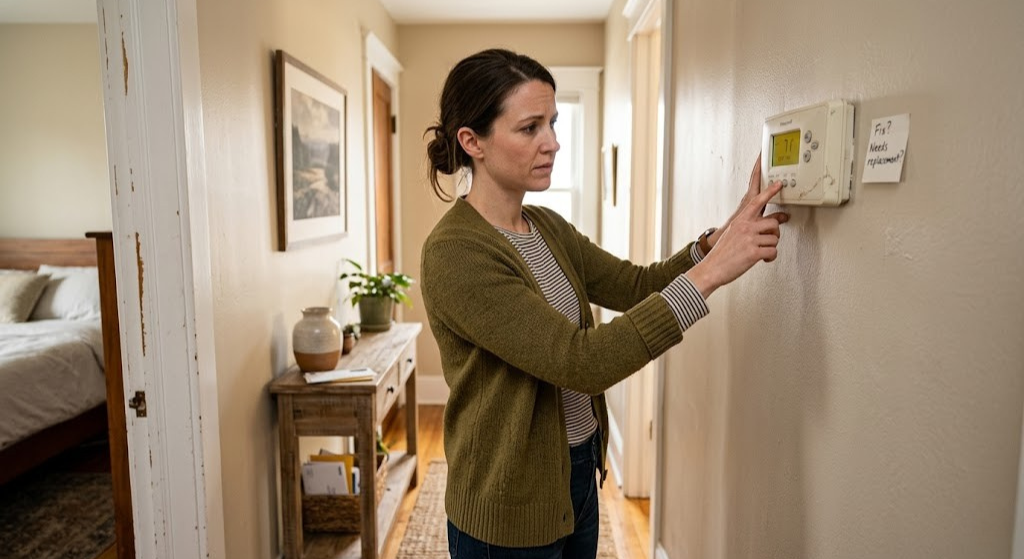
Your thermostat is the brain of your entire HVAC system — and like any brain, when it starts misfiring, everything else suffers. Rooms that are never quite the right temperature. A furnace that hesitates, short-cycles, or refuses to start. Energy bills that creep upward month after month despite nothing obvious changing. Any of that sound familiar?
The frustrating truth is that thermostat problems often masquerade as HVAC problems. Homeowners spend hundreds on service calls, new filters, and refrigerant charges before someone finally checks the device on the wall. This guide cuts through that confusion. We’ll walk you through every major symptom of a failing thermostat — from subtle early warnings to definitive failure signals — and give you a clear, tool-by-tool diagnostic path to confirm whether your thermostat is the problem, or whether something downstream in your HVAC system is to blame.
By the time you finish reading, you’ll know exactly whether to replace your thermostat, how to pick the right replacement, and whether you can do it yourself or need a pro.
The 12 Key Signs You Need a New Thermostat
Before we dive deep into each symptom, here’s a quick visual reference of the most telling signs that your thermostat has reached the end of its useful life. Think of this as your at-a-glance triage chart — the more boxes you check, the more likely you’re dealing with a thermostat problem rather than a broader HVAC issue.
Temperature Never Matches the Setting
Your home consistently feels 5–10°F warmer or cooler than the set temperature, even after waiting hours.
HVAC Won’t Turn On or Off
The system completely ignores the thermostat command, or runs continuously without shutting down.
Short-Cycling (Constant On/Off)
The system starts and stops every few minutes, never completing a full heating or cooling cycle.
Blank or Flickering Display
The display dims, flickers, shows partial characters, or goes completely dark after battery/breaker checks.
Unresponsive Controls
Buttons, touch inputs, or the dial don’t register correctly or require multiple presses to respond.
Energy Bills Spike Without Explanation
Monthly HVAC costs increase noticeably despite similar weather patterns and usage habits.
Thermostat Is 10+ Years Old
Old mechanical or early digital units lose calibration accuracy and have degrading relay contacts.
Temperature Reads Wildly Wrong
The displayed temperature differs by more than 2–3°F from a separate calibrated thermometer nearby.
Clicking But No HVAC Response
You hear the internal relay click but the furnace, air handler, or AC unit doesn’t respond.
Settings Disappear or Reset Randomly
Programmed schedules vanish, or the thermostat unexpectedly reverts to default settings.
Wiring Looks Burnt or Corroded
Visible corrosion, scorch marks, or loose terminals on the wiring behind the thermostat face.
HVAC Runs But No Conditioned Air Reaches Rooms
The system runs normally at the unit but the thermostat’s fan or zone signals aren’t triggering correctly.
Recognizing one of these signs alone doesn’t guarantee your thermostat is the root cause — but spotting two or more simultaneously makes a strong case for replacement. The sections below explain the diagnostic logic behind each symptom so you can build a confident conclusion.
Temperature Swings, Inaccuracy & Sensor Failure
Of all the thermostat problems homeowners encounter, inaccurate temperature reading is the most insidious — because it’s gradual. A sensor that’s drifting by half a degree a year won’t set off alarm bells until the cumulative error hits 4, 5, or 6 degrees. By then, you’ve been paying for wasted energy for years without realizing the culprit is a $30 thermistor inside the device on your wall.
How a Thermostat Measures Temperature
Modern thermostats — digital, programmable, and smart alike — use a small component called a thermistor (a thermally sensitive resistor) to measure ambient room temperature. As air temperature rises and falls, the thermistor’s electrical resistance changes proportionally, and the thermostat’s microprocessor converts that resistance reading into the temperature number you see on the display. When the thermistor degrades, gets contaminated with dust or moisture, or is poorly positioned relative to heat sources, the readings drift.
Mechanical bimetal thermostats — still found in millions of older homes — use a coiled strip of two metals with different expansion rates. Temperature changes cause the strip to curl and eventually complete or break an electrical circuit. These coils lose their calibration sensitivity over time, and some can be manually recalibrated. But most are simply too old for that to matter.
Location Bias: The Invisible Accuracy Killer
Even a perfectly functional thermostat will give misleading readings if it’s installed in a problematic location. Common culprits include:
- Direct sunlight hitting the wall or thermostat housing, which drives up the ambient sensor reading by 5–15°F
- Proximity to supply air vents, where conditioned air blows directly across the thermostat’s sensor, causing premature system shutoff in winter and early start in summer
- Near kitchens or appliances that generate cooking heat
- On exterior walls with poor insulation, where the sensor picks up outdoor temperature infiltration
- Near stairwells, where stratified air creates temperature pockets unrepresentative of the main living area
Before assuming sensor failure, rule out location bias. If moving to a better position isn’t practical, remote sensors — standard in smart thermostats like the ecobee — can solve the problem entirely without replacing the base unit.
When Inaccuracy Crosses Into Failure
There’s a meaningful difference between a thermostat that reads 2°F high due to location and one whose internal thermistor has failed. Signs of hardware sensor failure include: readings that jump suddenly by large margins (5°F+ in minutes with no corresponding air temperature change), readings that freeze at a fixed value regardless of actual temperature changes, and readings that are wildly inconsistent compared to multiple independent thermometers. If you’re experiencing these patterns, the device needs replacement. Sensor replacement in a thermostat is rarely cost-effective or even possible as a field repair.
Also worth noting: your thermostat showing the wrong room temperature isn’t always a hardware failure — software calibration issues in smart thermostats can sometimes be reset through factory reset procedures before replacement becomes necessary.

ecobee SmartThermostat Premium — Our Top Pick
Built-in air quality monitoring, remote SmartSensors included, Alexa built-in, and radar-based occupancy sensing. Best overall upgrade for homes replacing an aging thermostat.
🛒 Check Price on AmazonHVAC Won’t Start, Won’t Stop, or Short-Cycles
A thermostat that can’t reliably start or stop your HVAC equipment is failing at its most fundamental job. This symptom manifests in three distinct patterns, each with different underlying causes but a common thread: the thermostat’s ability to send and maintain clean electrical signals to the air handler or furnace control board has broken down.
Pattern 1: System Won’t Start At All
You raise the heat setpoint above room temperature, wait a few minutes, and nothing happens. Before blaming the thermostat, work through this quick hierarchy:
-
Check the thermostat mode
Confirm it’s set to HEAT (or COOL) rather than FAN ONLY or OFF. Obvious, but often overlooked.
-
Replace the batteries
Low batteries cause intermittent signal failures in battery-powered units. Even units with a C-wire sometimes have battery backup that misbehaves. Fresh batteries cost $3 and take 30 seconds.
-
Check the circuit breaker and furnace power switch
Confirm the HVAC breaker hasn’t tripped and the power switch on or near the furnace is ON.
-
Check for a furnace fault code
Most modern furnaces have LED fault indicators on the control board. A flashing code tells you whether the problem is upstream of the thermostat.
-
Test the thermostat wiring directly
At the air handler, briefly connect the R wire to the W wire (for heat). If the furnace starts, your system is fine and the thermostat is the problem. If it doesn’t start, the fault is in the HVAC equipment, not the thermostat.
Pattern 2: System Runs Continuously Without Shutting Off
The opposite problem — your HVAC system runs endlessly even after the room reaches the set temperature — is just as damaging. Continuous operation drives up energy bills, puts excessive wear on the compressor and heat exchanger, and can cause ice formation on AC evaporator coils. The thermostat’s internal relay may have failed in the “closed” position, keeping the system permanently energized, or the temperature sensor may be misreading the room as perpetually too hot or too cold.
It’s also worth checking whether your fan is set to ON rather than AUTO on the thermostat — a stuck fan switch causes the blower to run continuously even when heating and cooling cycles have ended. For a deeper look at this specific scenario, our guide on furnace won’t turn on but the fan works covers the diagnostic steps in detail.
Pattern 3: Short-Cycling (The Compressor Killer)
Short-cycling — where the HVAC system starts, runs for only 2–5 minutes, shuts off, and immediately restarts — is one of the most damaging operational patterns your equipment can experience. Each compressor startup draws a large electrical surge, and repeated short-cycling dramatically shortens compressor lifespan. The financial stakes are real: a failed compressor on a central AC system costs $1,200–$2,800 to replace.
Thermostat-related causes of short-cycling include:
- A misread ambient temperature causing the system to think it’s already hit the setpoint within minutes of starting
- A failing thermostat anticipator (in older mechanical units) set incorrectly
- Poor thermostat location near heat sources that briefly warm the sensor
- A “heat anticipator” that’s miscalibrated on bimetal units, triggering premature shutoff
- Oversized HVAC equipment combined with an inaccurate thermostat — a particularly brutal combination
Short-cycling can also be caused by issues completely unrelated to the thermostat, including a dirty air filter, refrigerant issues, or an oversized system. But if the HVAC equipment checks out and short-cycling persists, the thermostat’s sensing or relay circuitry is almost certainly involved.
Blank, Flickering, or Unresponsive Display
A thermostat display that won’t cooperate is frustrating — but it’s also diagnostic gold. The specific way a display fails can tell you a great deal about what’s actually wrong internally. Here’s how to read the symptoms.
Completely Blank Display
A totally dark screen is usually not a sign of catastrophic thermostat failure. The most common cause is exhausted batteries, particularly in units that don’t have a C-wire (common wire) providing continuous power from the HVAC system. Swap in fresh AA or AAA alkaline batteries as a first step. If the display comes back, great — but make a note to investigate whether your thermostat should have a C-wire installed for more reliable power, especially if this is a recurring issue.
If new batteries don’t revive the display, check the circuit breaker panel for the HVAC circuit and reset it if tripped. Also look for a small inline fuse near the furnace or air handler — a blown 3A or 5A fuse there will cut power to the thermostat’s C-wire feed. Our guide on thermostat low battery, fading display, and relay click failure covers this specific scenario with wiring diagrams.
If the display stays blank after batteries, breaker, and fuse checks, the thermostat’s internal power regulation circuit has failed. At that point, replacement is the correct path.
Flickering or Partially Blank Display
A display that flickers, shows only some segments, or partially lights up typically indicates one of two things: a failing backlight LED (cosmetic and doesn’t affect function) or voltage instability on the C-wire feed causing inconsistent power delivery to the display driver. The latter is more serious and often causes erratic HVAC behavior as well.
Unresponsive or Sticky Touch/Button Controls
Touchscreen thermostats develop dead zones over time as the capacitive touch layer degrades or accumulates dust and grease beneath the surface. Physical buttons can become sticky or fail to register due to oxidized contacts. While cleaning the screen surface sometimes helps, internal contact degradation is not field-repairable. If your thermostat requires multiple taps or hard presses to register input, the interface hardware has reached the end of its life.

Google Nest Learning Thermostat (4th Gen) — Best Self-Programming Option
Soli radar presence sensing, Matter support, mirror display, and auto-schedule learning. Ideal upgrade if you want a thermostat that manages itself.
🛒 Check Price on AmazonSkyrocketing Energy Bills: The Thermostat’s Silent Tax
Energy bills that creep upward without an obvious explanation are one of the most financially significant signs of thermostat failure — and one of the most frequently misattributed to other causes. Most homeowners blame drafty windows, aging insulation, or simply rising utility rates. But a thermostat that misreads temperature by even 3–4°F can add 10–25% to your monthly HVAC operating cost.
How a Faulty Thermostat Wastes Energy
The mechanism is simple: if your thermostat reads the room as 68°F when it’s actually 72°F, your AC will keep running long past the point of comfort to chase a setpoint it already passed. Multiply this by every heating and cooling cycle across an entire season, and the cumulative waste is substantial.
Short-cycling (covered in Section 3) causes a different kind of waste: each HVAC startup draws a surge of electricity, and a system that starts and stops 15–20 times per hour instead of running 3–4 efficient longer cycles uses significantly more energy per unit of conditioning delivered.
| Failure Mode | Energy Impact | Estimated Monthly Cost |
|---|---|---|
| Thermostat reads 3°F low (heats longer) | +8–12% heating runtime | +$12–$28/month |
| Thermostat reads 3°F high (cools longer) | +10–15% cooling runtime | +$15–$35/month |
| Short-cycling (15+ cycles/hr vs. 3–4 normal) | +20–30% compressor energy draw | +$25–$55/month |
| Fan stuck ON vs. AUTO | Blower runs 24/7 vs. ~40% duty cycle | +$18–$40/month |
| No scheduling (manual setback missed) | +10–20% vs. programmed setbacks | +$15–$45/month |
If you’re curious about quantifying the potential savings from replacing your old thermostat with a smart model, tools like our WiFi thermostat ROI payback calculator can give you a personalized estimate based on your home size, climate, and current energy rates.
Baseline Your Bills Before Replacing
Before attributing rising bills to the thermostat, pull 12 months of billing history and compare year-over-year for the same months (controlling for weather). If usage (kWh or therms) has increased while degree-days stayed similar, that’s a genuine efficiency decline. If only the dollar amount increased, rate hikes may be the culprit. The distinction matters before you invest in new equipment.
Age & Wear: When Is Your Thermostat Simply Too Old?
Thermostats don’t come with expiration dates stamped on the box. But they absolutely have useful service lives — and understanding where yours sits on that timeline changes the calculus of whether to troubleshoot versus replace.
| Thermostat Type | Typical Lifespan | Common Age-Related Failures | Upgrade Urgency |
|---|---|---|---|
| Mechanical / Bimetal | 20–35 years | Coil calibration drift, mercury switch failure, loose contacts | Replace Now |
| Basic Digital (non-programmable) | 10–20 years | Button failure, display degradation, sensor drift | Replace Now |
| Programmable Digital | 10–15 years | Memory corruption, relay wear, display failure | Evaluate & Upgrade |
| First-Gen Smart (pre-2015) | 8–12 years | WiFi chipset obsolescence, app support drops, sensor drift | Evaluate & Upgrade |
| Modern Smart (2018+) | 10–15 years (hardware) | Firmware support varies by manufacturer | Monitor Only |
The Mercury Switch Problem
If your thermostat is a round or rectangular mechanical unit — likely a Honeywell round dial thermostat or a bimetal slider model — it may contain a mercury switch inside. Mercury switches were standard in thermostats until they were phased out in the 1980s and 1990s. These devices require careful, upright disposal through hazardous waste programs, not regular trash. Beyond the disposal concern, mercury switch thermostats lose accuracy as the glass ampule seal degrades with age. If you’re still running one of these, replacement should be treated as urgent, not optional.
Smart Thermostats: Firmware Support Cutoffs
Smart thermostats introduce a new dimension to lifespan: software support. Google, ecobee, Honeywell Home (Resideo), and other manufacturers periodically discontinue firmware updates for older models. Once firmware support ends, you lose not just new features but active security patches — and eventually, connectivity to the cloud services the thermostat depends on. Check your manufacturer’s app or website to see whether your specific model is still listed as actively supported.
Wiring Problems, Relay Clicks & Electrical Failures
The wiring behind your thermostat is a frequently overlooked source of thermostat “failure” — problems that look like a dead thermostat but are actually caused by deteriorated wiring connections between the wall and the device. Understanding the difference can save you an unnecessary replacement purchase.
What to Look for When You Remove the Thermostat Cover
Gently remove the thermostat from its wall plate (most pop off or unscrew with one Phillips screw). With the wires still connected, examine:
- Wire insulation color: Green or black discoloration around terminals indicates heat damage or arcing
- Wire tips: Oxidized (dull, gray, or green-tinged) copper strands indicate poor conductivity — strip back 1/4 inch and reattach
- Terminal tightness: Loose wire connections cause intermittent contact issues that mimic thermostat failure
- Wire length: Very short wires with no slack can pull loose over years of temperature cycling — check our guide on thermostat wire extension and splicing if you find this problem
The Relay Click Test
The clicking sound you hear when a thermostat calls for heat or cooling is the sound of an electromechanical relay switching. When you hear a click but the HVAC doesn’t respond, you’re dealing with one of three scenarios:
- The relay is clicking but not completing the circuit (relay contacts are worn or pitted)
- The relay is working but the signal isn’t reaching the HVAC due to wiring issues
- The relay signal is reaching the HVAC but the HVAC itself isn’t responding (separate equipment issue)
Our detailed guide on thermostat clicks but HVAC won’t start walks through every step of this diagnostic with voltage testing instructions.
Common Wiring Failures by System Type
| Wire | Function | Failure Symptom | DIY Fix? |
|---|---|---|---|
| R (Red) | 24V power supply | Thermostat completely dead | Check at transformer |
| W (White) | Heat call | No heating response | Test R-to-W at air handler |
| Y (Yellow) | Cooling call | No AC response | Test R-to-Y at air handler |
| G (Green) | Fan call | Fan won’t run on command | Test R-to-G at air handler |
| C (Blue/Black) | Common (24V return) | Display flickering, power theft issues | Add C-wire or adapter |

Honeywell Home T9 Smart Thermostat — Best for Multi-Room Sensing
Wireless SmartRoom sensors, geofencing, flexible scheduling, and broad HVAC compatibility. A reliable, proven smart thermostat with excellent range coverage.
🛒 Check Price on AmazonThe DIY 10-Minute Thermostat Diagnostic
Before you order a new thermostat, walk through this structured 10-minute test. It will either confirm the thermostat as the problem or redirect you to the real issue. You’ll need a screwdriver, a multimeter (optional but helpful), and a separate digital thermometer.
If you want a more comprehensive diagnostic framework with voltage readings and multimeter tests, our 10-minute faulty thermostat checklist covers every possible failure point with pass/fail criteria.
| Test Result | What It Means | Next Action |
|---|---|---|
| System starts after bypass test | Thermostat or wiring is the problem | Check wiring first; replace thermostat if wiring is OK |
| System doesn’t start after bypass | HVAC equipment has its own fault | Check furnace fault codes; call HVAC tech |
| Thermostat reads 3°F+ off vs. thermometer | Sensor failure or location bias | Test relocation; replace thermostat if sensor is faulty |
| Thermostat clicks, system doesn’t start | Relay works, signal not reaching unit | Check wiring continuity; test at air handler |
| No click when setpoint raised | Relay or control board failure | Replace thermostat |
Repair vs. Replace: How to Make the Call
The repair vs. replace decision comes down to three factors: the cost of repair, the age of the unit, and the opportunity cost of staying with outdated technology. Here’s a structured framework for making the call.
When Repair Makes Sense
Thermostat repair is genuinely worth considering only in specific scenarios: you have a high-end smart thermostat (ecobee, Nest) that’s less than 5 years old and experiencing a firmware or software issue fixable through a factory reset; the problem is clearly isolated to the wiring between the thermostat and air handler (not the device itself); or you have a specialized multi-stage or zoned system thermostat (like a Honeywell Hz311 zone control) where replacement involves complex rewiring.
When Replacement Is the Right Call
✓ Replace If:
- The unit is 10+ years old
- Physical buttons or touchscreen have failed
- Temperature accuracy is off by 3°F+ consistently
- The relay doesn’t click or clicks but fails to send signal
- Firmware/app support has been discontinued
- You’ve already spent time and money troubleshooting
- Wiring is intact and HVAC checks out fine
- Upgrading to smart features would benefit your schedule/energy use
✗ Don’t Replace Yet If:
- Dead batteries were the only issue
- A loose wire connection was the culprit
- The HVAC system itself has a fault (bypass test failed)
- A firmware update is available and resolves the problem
- Temperature error is small (<2°F) and due to poor location (moveable)
- Unit is under 3 years old with active warranty
The True Cost of Not Replacing
Homeowners often defer thermostat replacement because “it mostly works.” But the hidden cost of a partly functional thermostat — inflated energy bills, shortened HVAC equipment life from short-cycling, and comfort problems — typically exceeds the cost of a mid-range smart thermostat within a single heating or cooling season. A $150–$200 smart thermostat that saves 15% on a $180/month energy bill pays for itself in about 6 months, before accounting for utility rebates that can further reduce the upfront cost.
If you’re on the fence about whether upgrading to a smart thermostat actually delivers measurable savings, the data on smart thermostat energy savings with geofencing is worth a read — the numbers for geofencing-enabled models are particularly compelling.
Smart Thermostat Upgrade Guide: What’s Actually Worth Buying
If the diagnostic evidence points to thermostat replacement, the natural follow-up question is: what should you replace it with? The thermostat market in 2026 offers more options than ever — from budget-conscious $30 programmable units to $250 AI-powered smart thermostats with radar sensors, air quality monitors, and multi-zone coordination. Here’s how to cut through the noise.
Tier 1: Budget Replacements ($25–$60)
If you want a functional, reliable replacement without smart features, basic programmable digital thermostats from Honeywell Home (T4 Pro, T5), Emerson, and Lux deliver reliable temperature control with simple 7-day scheduling. These are ideal for rental properties, guest houses, or situations where simplicity is preferred over connectivity. Expect 10–15 years of reliable service with proper installation.
Tier 2: Connected Smart Thermostats ($100–$170)
The sweet spot for most homeowners. Thermostats like the ecobee3 Lite, Amazon Smart Thermostat, Wyze Thermostat, and Sensi Touch offer WiFi connectivity, app control, scheduling, and geofencing at prices that deliver quick payback periods. These models are compatible with most 24V HVAC systems and include installation guides that make DIY replacement approachable even for first-timers.
Tier 3: Premium Smart Thermostats ($180–$260)
For whole-home optimization, premium models deliver measurably better performance. The ecobee Premium includes remote SmartSensors, air quality monitoring (VOC + CO2), built-in Alexa, and radar-based occupancy sensing. The Nest Learning Thermostat 4th Gen adds Soli radar presence detection, Matter smart home protocol support, and a stunning mirror display. For multi-stage HVAC systems with heat pumps or dual-fuel setups, our Nest vs. Honeywell multi-stage HVAC comparison will help you pick the right advanced model.
| Model | Price Range | Best For | C-Wire Required? | Remote Sensors? |
|---|---|---|---|---|
| Honeywell T5 Pro | $30–$45 | Simple replacement, rentals | No | No |
| Amazon Smart Thermostat | $60–$75 | Alexa homes, budget smart upgrade | Adapter included | No |
| Wyze Thermostat | $55–$70 | Budget-conscious smart upgrade | Adapter included | No |
| Sensi Touch 2 | $110–$130 | Simple install, multi-stage support | Recommended | No |
| ecobee3 Lite | $140–$160 | Energy savings, scheduling focus | Yes (PEK adapter included) | Optional add-on |
| Nest Learning Thermostat 4th Gen | $200–$240 | Auto-learning, premium aesthetics | Usually needed | Via separate sensor |
| ecobee Premium | $220–$260 | Air quality, radar occupancy, multi-room | Yes (PEK included) | SmartSensor included |
Keep in mind that utility rebates can substantially change the effective cost of smart thermostat upgrades. Many programs offer $25–$100 back for qualifying smart thermostat installations. Our comprehensive guide to 2026 smart thermostat rebates covers available programs by state and utility provider.
Compatibility: What You Need to Know Before Buying
The single biggest mistake homeowners make when buying a replacement thermostat is not confirming compatibility with their HVAC system before purchasing. Most returns and installation headaches trace back to this one oversight. Here’s what to check.
Low-Voltage vs. Line-Voltage Systems
The vast majority of central HVAC systems (forced air furnaces, central AC, heat pumps) use low-voltage (24V) thermostat wiring. These systems are compatible with essentially all programmable and smart thermostats. However, electric baseboard heaters and some radiant systems use line-voltage (120V or 240V) wiring, which requires specialized line-voltage thermostats — not the 24V smart thermostats sold by Google, ecobee, Honeywell Home, and Amazon. If you have electric baseboard heat, you need a line-voltage specific model like the Mysa Smart Thermostat.
The C-Wire Question
Smart thermostats require continuous power to maintain WiFi connectivity, run displays, and operate sensors. They get this power through the C-wire (common wire) — the 24V return path in the thermostat wiring bundle. Many homes, particularly those with older heating systems, were wired without a C-wire since traditional thermostats didn’t need it.
Solutions if you lack a C-wire:
- Adapter kits (included with Amazon Smart Thermostat, Wyze): Use the G wire as a C-wire substitute
- ecobee PEK (Power Extender Kit): Installs at the air handler and creates a C-wire signal without new wire runs
- Nest power stealing: Nest thermostats can often run without a C-wire by drawing trickle power through control wires — reliable in some installs, problematic in others
- Run a new C-wire: The cleanest solution if an unused wire exists in the bundle at the air handler (common — look for an unused wire in your thermostat bundle)
Multi-Stage, Heat Pump & Dual-Fuel Considerations
If your system is a heat pump, uses multiple stages of heating or cooling, or is a dual-fuel setup (gas + heat pump), you need a thermostat with explicit support for these configurations. Not all smart thermostats handle O/B (reversing valve) wiring for heat pumps correctly. Always cross-reference the thermostat’s compatibility checker with your specific equipment model numbers before purchasing. Our guide on thermostat compatibility with your furnace provides a complete breakdown by system type.
Zoned Systems
Homes with zone control systems (multiple thermostats controlling separate areas via zone dampers) require careful thermostat selection. Some smart thermostats work seamlessly in zoned setups; others cause communication conflicts with zone control boards. If you have a zoned system, verify compatibility explicitly before purchasing.

Emerson Sensi Touch 2 — Easiest Smart Thermostat to Install
Color touchscreen, illuminated terminals for easy wiring, multi-stage HVAC support, and a straightforward app-guided installation. Perfect for first-time smart thermostat buyers.
🛒 Check Price on AmazonInstallation: DIY or Call a Pro?
The good news: thermostat replacement is one of the most beginner-friendly DIY home improvement tasks. Most homeowners with basic comfort using a screwdriver can complete a standard thermostat swap in 30–45 minutes. The caveats: there are specific situations where DIY becomes complicated, and knowing the difference upfront saves frustration.
DIY-Friendly Scenarios
- Standard 24V low-voltage forced-air system (furnace + central AC)
- 4–5 wires present with recognizable color codes (R, W, Y, G, C)
- Replacing a thermostat on the same wall location
- No complex multi-zone wiring
- Single-stage heating and cooling
Call a Pro When:
- Line-voltage (120V/240V) baseboard heat wiring is present
- You count more than 6 wires and can’t identify all of them
- You have a zone control board that requires reconfiguration
- The HVAC still doesn’t work after thermostat replacement (points to equipment fault)
- You’re switching from a multi-zone setup to a centralized smart system
- There’s evidence of wire damage or rodent chewing in the wall cavity
Step-by-Step DIY Thermostat Replacement Overview
- Turn off HVAC at breaker — safety first, always
- Photograph the current wiring before disconnecting anything — label each wire with tape if you’re uncertain
- Remove the old thermostat from the wall plate; note which wire is connected to which terminal letter
- Connect wires to the new thermostat’s base plate matching terminal letters
- Mount the new base plate to the wall (use a level if the new unit has a visible bubble level)
- Snap on the thermostat body, restore power at the breaker
- Follow the app-guided setup for smart thermostats — this configures the system type (heat pump vs. conventional), staging, and emergency heat settings
- Test all modes: heat, cool, and fan before calling the job done
Cost-wise, professional thermostat installation typically runs $80–$150 for a standard swap. If you have a complex system or the job requires running new thermostat wire, expect $150–$300. For context, that labor cost approaches or exceeds the device cost for mid-range smart thermostats — a strong incentive to tackle the DIY route if your comfort level allows it.
What to Do If Your New Thermostat Doesn’t Work
If you’ve installed a new thermostat and the system still doesn’t respond, don’t panic. The most common culprits after a DIY install are a wire connected to the wrong terminal, a loose or disconnected wire at the air handler end (not just at the thermostat), or the new thermostat not being fully snapped onto its base plate. Work through the bypass test described in Section 8 to confirm whether the new thermostat is sending signals correctly. If it is but the system doesn’t start, the HVAC equipment itself needs attention.
Frequently Asked Questions
The quickest test is to raise the set temperature 5°F above current room temp and listen for your system to respond within 2–3 minutes. If it doesn’t click or start, check the circuit breaker, then swap thermostat batteries. If the HVAC responds to a direct 24V test at the air handler (briefly touching the R wire to the W wire) but not through the thermostat, the thermostat is almost certainly the culprit. If the system doesn’t respond even with the bypass test, the fault lies in the HVAC equipment itself.
Absolutely. A failing thermostat that misreads room temperature causes your HVAC to run longer than necessary or cycle on and off too frequently. Both scenarios waste energy. A thermostat reading 3°F below actual temperature in heating mode, for example, will run your furnace until the room reaches 3°F above your actual setpoint before shutting off. Over a full heating season, that error can add 10–25% to HVAC operating costs. Upgrading to a smart thermostat with accurate sensing and scheduling can recover those losses and more.
Mechanical and basic digital thermostats typically deliver 10–20 years of reliable service, though calibration accuracy degrades over time. Smart thermostats have a somewhat shorter electronics lifespan of 8–12 years due to more complex circuitry and WiFi radios. However, software updates and firmware support often become the practical end-of-life trigger for smart thermostats — once a manufacturer discontinues support for a specific model, connectivity and security updates stop arriving, making replacement advisable even if the hardware still functions.
In almost all cases, replacement is more cost-effective than repair. Thermostat components — sensors, relays, circuit boards — are rarely sold separately for field replacement, and labor to diagnose and attempt repair typically equals or exceeds the cost of a new unit. Entry-level digital thermostats start under $30, and even premium smart models with full features run $150–$250. The only scenarios where repair genuinely makes sense are: a wiring connection issue (not the device), a firmware/software fix on a smart thermostat under warranty, or a very recent premium installation still covered by manufacturer warranty.
Not necessarily — a blank display is most often caused by dead batteries, a tripped circuit breaker, or a blown fuse at the air handler. Try replacing batteries with fresh alkalines and resetting the HVAC breaker first. Also check for a small 3A or 5A fuse near the furnace control board, which protects the 24V transformer and can blow without tripping the main breaker. If the display stays blank after all three of those checks, the thermostat’s internal power regulation circuit has likely failed and replacement is appropriate.
A thermostat click followed by no HVAC response points to one of three scenarios: (1) the relay is clicking but its contacts have worn to the point they’re not completing the circuit; (2) the relay is working but the signal wire between the thermostat and air handler has a break or loose connection; or (3) the thermostat signal is reaching the HVAC but a separate fault at the furnace or AC unit — such as a tripped high-limit switch, failed control board, or blown fuse — is preventing a response. The bypass test (Section 8) distinguishes between these possibilities in about 2 minutes.
Yes, particularly when upgrading from a failing or non-programmable thermostat to a smart model. Energy savings of 10–23% on heating and cooling costs are consistently reported across studies and utility data. The savings come from multiple sources: accurate temperature sensing, schedule-based setbacks when the home is empty or occupants are sleeping, and geofencing that automatically adjusts temperature based on whether you’re home. Utility rebates of $25–$100 further shorten the payback period, which for many households falls under 12 months.
Key signs of sensor failure include: the HVAC running when you feel comfortable (or not running when you’re clearly hot or cold), the thermostat reading a temperature wildly different from an independent thermometer placed nearby, inconsistent or jumping temperature readings over short periods, short-cycling HVAC equipment, and rooms that never reach the set temperature despite the system running continuously. A sensor that reads consistently 3°F+ off from an independent thermometer in the same location is a strong indicator of sensor hardware failure rather than location bias.
The age of your old thermostat doesn’t affect smart thermostat compatibility — what matters is your HVAC wiring system. Most homes wired after 1975 use standard 24V low-voltage thermostat wiring compatible with modern smart thermostats. The primary compatibility hurdle is the C-wire (common wire) for continuous smart thermostat power, which many older homes lack. Fortunately, adapter kits, Power Extender Kits (ecobee), and unused wires in existing bundles solve this in most cases without rewiring the home.
Standard 24V thermostat replacement is a beginner-friendly DIY project that most homeowners can complete in 30–45 minutes. The wiring uses color-coded low-voltage conductors (safe to handle), and modern smart thermostats include step-by-step guided apps. You should call an HVAC technician if your system uses line-voltage wiring (120V/240V for electric baseboard heat), if you have more than 5 wires you can’t identify, if the system has a zone control board requiring reconfiguration, or if the HVAC still doesn’t respond after thermostat replacement — indicating a separate equipment fault that needs professional diagnosis.
Conclusion: Trust Your Home’s Discomfort
Your home’s temperature should be reliable, consistent, and comfortable without constant attention. When the thermostat starts failing — whether through drifting sensors, unreliable relay signals, blank displays, or inexplicably rising energy bills — it’s telling you something important. And unlike HVAC equipment failures that can cost thousands to repair, a thermostat replacement is one of the most affordable and impactful home improvement investments available.
The signs are clear. If your rooms never feel right, if your HVAC behaves erratically, if your energy bills have crept upward without explanation, or if your thermostat is simply over a decade old — the evidence points toward replacement. Work through the 10-minute diagnostic in Section 8 to confirm the thermostat is the source rather than the symptom, and then make the upgrade with confidence.
Modern smart thermostats don’t just replace your old device’s function — they improve on it substantially. Accurate multi-sensor temperature averaging, geofencing that adapts to your actual schedule, and energy reporting that shows you exactly what you’re saving all contribute to a measurably more comfortable and efficient home. For most households, the investment pays for itself within a single heating or cooling season, making this one of the clearest yes-or-no home upgrade decisions available.
Ready to Diagnose or Upgrade Your Thermostat?
Use our expert resources to confirm the problem, pick the right replacement, and make the switch with confidence — whether you’re doing it yourself or calling a pro.
🔍 Run the Full Diagnostic Checklist →




 Home
Home
 Info
Info
 Compare
 Reviews
 Shop
Shop