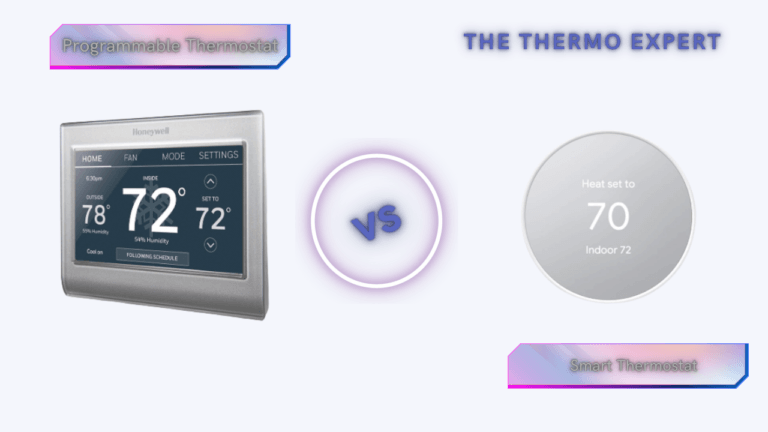
Smart vs. Programmable Thermostats: The 2026 Guide
Deciding between cost-effective scheduling and AI-driven automation for your home energy management.
Directly affecting energy consumption, cost savings, and comfort levels, the thermostat is the undisputed control center of the heating and cooling system in your house. Historically, manual thermostats—those beige dials of yesteryear—have been ineffective in energy management as they required constant, vigilant manual adjustments. However, rapid developments in residential HVAC technology have offered homeowners two sensible, modern choices: smart thermostats and programmable thermostats.
In the landscape of 2026, where energy prices have fluctuated and grid sustainability is a global priority, the choice between these two devices is more significant than ever. Programmable thermostats offer a “set it and forget it” schedule based on your input, while smart thermostats utilize Artificial Intelligence (AI) and machine learning to predict your needs before you even realize them. Both offer clear benefits over manual equivalents, particularly regarding automation and energy economy. But which offers the best return on investment for your specific lifestyle?
To enable you to decide with knowledge, this comprehensive guide investigates the main variations, advantages, and possible disadvantages of both thermostat kinds, updated with the latest industry standards for 2026. We’ll explore everything from basic scheduling logic to advanced geofencing technology that can dramatically cut HVAC runtime, helping you understand precisely how these devices impact your monthly energy bills.
Before diving deep into the comparison, it’s worth understanding what makes modern thermostats tick. At their core, both smart and programmable units rely on thermistors—precision temperature-sensing components that provide far more accurate readings than the old bimetallic strips found in manual thermostats. This accuracy alone can save 1-2% on energy costs by eliminating the temperature swing inherent in older mechanical devices.
Understanding Programmable Thermostats
What is a Programmable Thermostat?
A programmable thermostat is a digital device that allows users to pre-set temperature regimens for different times of the day and week. Unlike “smart” devices, these do not connect to the internet, do not have apps, and do not “learn.” They are logic-based switches. These devices improve energy efficiency by automating temperature changes based strictly on a schedule you define.
Typically, these thermostats offer three main types of scheduling models:
- 7-Day Programming: Allows a unique schedule for every single day of the week. Best for people with erratic schedules.
- 5-1-1 Programming: One schedule for the weekdays (Mon-Fri) and separate schedules for Saturday and Sunday.
- 5-2 Programming: One schedule for weekdays and one shared schedule for the weekend.
Correct usage involves setting “setback” periods—for example, lowering the heat by 8 degrees while you are at work. According to the Department of Energy, proper setback strategies can save up to 10-20% on energy costs annually. However, the caveat is human behavior; many users find the interfaces clunky and end up using the “Permanent Hold” feature, effectively turning it back into a manual thermostat and negating all savings. This is precisely why understanding the difference between schedule-based and learning-based temperature control is crucial before making a purchase decision.
Benefits of Programmable Thermostats
- Cost-Effective: They are significantly more affordable upfront, often costing between $20 and $80.
- No Privacy Concerns: Since they do not connect to the cloud, there is no data tracking, no risk of hacking, and no sharing of your data with tech giants.
- Reliability: They do not depend on Wi-Fi. If your internet goes down or your router fails, your heating schedule continues uninterrupted.
- Battery Efficiency: Many models run for years on AA batteries without needing a “C-wire” (Common wire) for power.
Limitations
- Rigidity: If you come home early from work, the house will be cold unless you manually override it.
- User Interface: Programming them often involves pressing tiny rubber buttons in complex sequences, which deters users from optimizing schedules.
- No Remote Access: You cannot adjust the temperature from bed or while on vacation.
Understanding Smart Thermostats
What is a Smart Thermostat?
Smart thermostats represent the pinnacle of home automation. They learn household habits, dynamically change temperatures using algorithms, and provide remote control via Wi-Fi-enabled applications. In 2026, these devices have evolved to support the Matter smart home standard, allowing them to communicate seamlessly with Apple, Google, Amazon, and Samsung ecosystems without compatibility headaches.
The defining feature of a smart thermostat is Contextual Awareness. Through a combination of motion sensors (occupancy detection), Geofencing (tracking your phone’s GPS location), and local weather data, the thermostat knows exactly when to heat or cool your home. It doesn’t just run a schedule; it adapts to reality. This adaptive learning capability is what separates a truly intelligent device from a simple timer-based controller.
Key Features in 2026
- AI-Driven Learning: The device notes that you consistently turn the heat down at 10 PM and begins to automate that process after a few days.
- Remote Access: Control your climate from anywhere in the world. Forgot to turn the AC off before your flight? Do it from the airport.
- Energy Grid Integration: Many modern smart thermostats can participate in “Demand Response” programs, where utility companies offer credits for slightly adjusting your temperature during peak grid usage hours.
- HVAC Health Monitoring: These devices can detect anomalies in your system, such as a failing compressor or a clogged filter, and alert you before the system breaks down completely.
- Remote Sensor Integration: Place sensors in problem rooms to average temperatures across your home, eliminating hot and cold spots.
- Home/Away Assist: Automatically switches to energy-saving mode when the house is empty, even if your schedule changes unexpectedly.
Benefits of Smart Thermostats
- Maximum Efficiency: By strictly heating/cooling only when necessary (and utilizing Eco modes when you leave), savings often exceed those of programmable units.
- Convenience: Voice control integration (“Hey Google, set temperature to 72”) is a game-changer for accessibility and ease of use.
- Data Insights: Monthly “Energy Reports” gamify savings, showing you exactly how many hours your system ran and where you can improve.
Limitations
- High Upfront Cost: Prices range from $130 to over $300.
- Connectivity Dependency: While they still function as basic thermostats without Wi-Fi, they lose 90% of their value (remote access, smart features) if the internet cuts out.
- Installation Complexity: Most require a C-wire to provide constant power for the Wi-Fi radio and display, which can complicate installation in older homes.
Comparison: Smart vs. Programmable
| Feature | Programmable Thermostat | Smart Thermostat |
|---|---|---|
| Primary Function | Runs a rigid, pre-set time schedule. | Adapts automatically to behavior & location. |
| Remote Access | No (requires physical interaction). | Yes (via Smartphone/Web). |
| Learning Ability | None. | High (AI & Pattern Recognition). |
| Installation | Easy (Battery powered usually). | Moderate (Often requires C-Wire). |
| Price Range | $20 – $80 | $100 – $350+ |
| Energy Savings | ~10-15% (Dependent on user diligence). | ~15-23% (Automated/Passive). |
| Privacy | High (Local only). | Moderate (Data stored in cloud). |
The Geofencing Revolution: How Location Awareness Transforms Energy Savings
If there’s one technology that definitively separates smart thermostats from their programmable counterparts, it’s geofencing. This feature uses your smartphone’s GPS to create a virtual perimeter around your home—typically with a customizable radius that can range from 500 feet to several miles. When you cross this boundary heading home, your thermostat begins pre-heating or pre-cooling. When you leave, it immediately switches to energy-saving mode.
How Geofencing Cuts HVAC Runtime
The energy-saving mechanism is elegantly simple. Instead of running your HVAC on a fixed schedule—which might heat an empty house for hours if you work late—geofencing ensures the system only operates when someone is actually home. Studies have shown that geofencing alone can reduce HVAC runtime by 10-15% compared to even the best-programmed schedule, simply by eliminating unnecessary heating and cooling during unexpected absences.
Modern smart thermostats support multi-user geofencing, meaning the system tracks all household members’ phones. The “Away” mode only activates when everyone has left, and “Home” mode engages when the first person returns. This eliminates the frustration of coming home to a cold house because your spouse’s schedule differed from yours—a common limitation of programmable thermostats.
Geofencing Accuracy by Brand
Not all geofencing implementations are created equal. Brands like Honeywell have refined their geofencing algorithms for exceptional accuracy, using a combination of GPS, Wi-Fi triangulation, and cellular tower data to minimize false triggers. Ecobee’s approach integrates their remote sensors with geofencing to create a hybrid system that’s remarkably responsive. Understanding these differences is crucial when comparing models, as poor geofencing implementation can actually increase energy usage by triggering unnecessary system cycles.
Real-World Energy Savings Analysis: Smart vs. Programmable
Let’s move beyond marketing claims and examine actual measured savings from both thermostat types. The Department of Energy’s long-standing assertion that proper thermostat use can save 10% annually is a useful baseline, but real-world results vary dramatically based on climate, home insulation, and user behavior.
The Programmable Paradox
Studies have revealed a troubling pattern: many programmable thermostat owners never actually program them. A Lawrence Berkeley National Laboratory survey found that nearly 40% of programmable thermostat owners used the “hold” feature permanently, essentially converting their programmable device into a manual thermostat and achieving zero energy savings. This “programmable paradox” explains why Energy Star suspended its certification program for programmable thermostats in 2009—the technology worked in theory but failed in practice due to human factors.
For users who do program correctly, savings of 10-15% are achievable. A typical 2,000-square-foot home with average insulation in a mixed climate might save $100-150 annually with diligent scheduling. However, this requires seasonal adjustments (different schedules for heating vs. cooling seasons) that many homeowners neglect.
Smart Thermostat Savings: Measured Results
Smart thermostats eliminate the human behavior problem through automation. Independent studies comparing AI-learning thermostats against schedule-based units consistently show 15-23% heating savings and 10-15% cooling savings. Nest’s own data (verified by third-party studies) shows average savings of 10-12% on heating and 15% on cooling. Ecobee reports similar figures, with their users averaging 23% savings in homes with multiple occupancy sensors.
What drives these higher savings? Three factors:
- Automatic setbacks during sleep: Smart thermostats typically default to 65°F for sleeping hours, the temperature science shows optimizes both comfort and energy efficiency.
- Elimination of “ghost” heating/cooling: Geofencing prevents the system from running when the house is unexpectedly empty.
- Seasonal adaptation: The thermostat learns that it takes longer to heat the house in January than October and adjusts startup times accordingly.
Electricity Consumption of Thermostat Components
One often-overlooked aspect of thermostat selection is the power draw of the device itself. Smart thermostats with full-color touchscreens and Wi-Fi radios consume more electricity than simple programmable units, though the difference is small. The real consideration is how the thermostat controls your HVAC fan. Understanding how much electricity your system’s fan consumes when running independently of heating/cooling can help you make better decisions about fan scheduling features offered on smart models.
Installation Deep-Dive & C-Wire Solutions
The installation process for both thermostat types varies significantly in complexity. While programmable thermostats typically install in 15-30 minutes with basic tools, smart thermostats often require additional wiring considerations that can challenge even experienced DIYers.
When Your Thermostat Clicks But Nothing Happens
One common installation pitfall occurs when a new thermostat appears to function—relays click, the display lights up—but the HVAC system never actually starts. This frustrating scenario often traces back to wiring issues, depleted batteries, or a tripped breaker. Before calling an HVAC technician, systematic troubleshooting can resolve many of these issues:
- Verify the breaker supplying your HVAC equipment hasn’t tripped
- Check that fresh batteries are installed (if battery-powered)
- Ensure wires are fully seated in their terminals
- Confirm the furnace door switch is fully engaged (most furnaces have a safety switch that cuts power when the access panel is removed)
Complete Diagnostic Checklist for Faulty Thermostats
If you’re experiencing issues beyond simple installation, a systematic approach to diagnosis can save hundreds in service calls. Our comprehensive 10-minute diagnostic checklist for identifying faulty thermostat symptoms walks through every common failure mode. Key checks include:
- Verify the thermostat display shows the correct room temperature (a discrepancy suggests thermistor failure)
- Test each mode (Heat, Cool, Fan) independently
- Measure voltage across the R and C terminals (should read 24-28V AC)
- Jumper R to W (heat) or R to Y (cool) at the thermostat base to test if the issue is the thermostat or the HVAC equipment
How to Tell If Your Thermostat Is Truly Bad
Sometimes the thermostat itself is the culprit. Twelve specific symptoms indicate thermostat failure, ranging from the obvious (blank display) to the subtle (temperature readings that drift over time). Common red flags include:
- The thermostat display is blank despite fresh batteries and verified power to the unit
- The system short-cycles (turns on and off repeatedly in quick succession)
- The displayed temperature doesn’t match a calibrated thermometer placed nearby
- You hear clicking from the thermostat but the system never activates
- The thermostat reboots or resets to factory defaults without user intervention
Which One Is Right for You?
Choose a Programmable Thermostat If:
- You have a highly predictable routine: If you leave at 8 AM and return at 6 PM every single day without fail, a rigid schedule works perfectly fine.
- You are on a strict budget: The ROI (Return on Investment) takes longer with a $250 smart thermostat than with a $30 programmable one.
- You prioritize privacy: If you are uncomfortable with Google or Amazon having data on your home occupancy, the “dumb” device is the superior choice.
- You live in a rental: You may not want to invest in expensive hardware or mess with wiring in a temporary home.
Choose a Smart Thermostat If:
- Your schedule is erratic: If you work freelance, travel often, or have kids with varying activity times, geofencing is the only way to save energy effectively.
- You want “Peace of Mind”: The ability to check your home’s temperature while on vacation to ensure pipes haven’t frozen is invaluable.
- You love data: If you want to track your carbon footprint and see granular usage statistics.
- You have a multi-zone home: Smart thermostats with remote room sensors (like Ecobee) can solve hot/cold spots in a house much better than a central programmable unit.
Installation & Compatibility: The “C-Wire” Issue
Before purchasing, compatibility is the biggest hurdle. The most common issue is the “C-Wire” (Common Wire). Old thermostats only needed wires to toggle the heat (R and W). Smart thermostats act as computers; they need a constant stream of 24V electricity to power their color touchscreens and Wi-Fi radios. The C-wire provides this return path for electricity.
How to Check:
- Turn off power to your HVAC system at the breaker.
- Pop the faceplate off your current thermostat.
- Look at the wires connected to the terminals. If you see a wire connected to the “C” terminal, you are good to go.
- If there is no C-wire, check if there is an unused wire tucked into the wall bundle.
No C-Wire? No Problem. In 2026, most major brands offer “Power Extender Kits” (PEK) included in the box. These small adapters install at your furnace control board and allow you to repurpose existing wires to carry power. Alternatively, plug-in adapters are available. Note: While some thermostats claim to work without a C-wire via “power stealing,” HVAC professionals generally advise against this as it can cause weird behavior in sensitive modern furnaces.
For those encountering persistent power issues after installation, thermostat rebooting problems often trace back to voltage drops from overloaded transformers. When the AC compressor kicks on, the momentary voltage sag can cause smart thermostats to reboot if the transformer is undersized. Replacing the furnace transformer with a higher VA rating (typically 40VA instead of 20VA) resolves this issue permanently.
Moving a Thermostat to a Better Location
Thermostat placement significantly affects both comfort and efficiency. A thermostat mounted in direct sunlight, near a drafty window, or in a rarely-used hallway will produce inaccurate readings that waste energy. Moving a thermostat requires careful wire extension and splicing, but the comfort improvement can be dramatic. Key principles include:
- Place thermostats on interior walls away from direct sunlight, windows, and doors
- Mount at approximately 5 feet from the floor
- Avoid locations behind furniture, curtains, or in “dead” air spaces
- Keep at least 18 inches from supply registers that could create false readings
Line Voltage vs. Low Voltage: A Critical Distinction
Before ordering any thermostat, you must determine whether your home uses line-voltage or low-voltage control. Line-voltage thermostats (120V or 240V) are common in electric baseboard heating, radiant ceiling panels, and some older homes. Low-voltage systems (24V) are standard for central forced-air HVAC. Our 2-minute wiring test shows exactly how to identify which type you have—installing a low-voltage thermostat on a line-voltage system will destroy the thermostat instantly and potentially create a fire hazard.
Winter Vacation Settings & Pipe Freeze Prevention
One of the most anxiety-producing aspects of winter travel is wondering whether your pipes will freeze while you’re away. Both programmable and smart thermostats can address this concern, but in very different ways. Proper winter vacation thermostat settings balance three competing priorities: preventing frozen pipes, minimizing energy consumption, and protecting houseplants and electronics from extreme cold.
Recommended Vacation Settings by Climate Zone
The “perfect” vacation temperature depends on your home’s insulation quality, the expected outdoor temperatures, and your plumbing configuration:
- Moderate climates (lows above 20°F): Set thermostat to 55-58°F. This provides adequate freeze protection while minimizing heating costs.
- Cold climates (lows 0-20°F): Maintain at least 60°F, especially if you have plumbing in exterior walls.
- Extreme cold (lows below 0°F): Consider 62-65°F and have a neighbor check daily. Open cabinet doors under sinks to allow warm air to reach plumbing.
Smart thermostats offer a distinct advantage here: remote temperature monitoring. If your furnace fails while you’re away, a programmable thermostat provides no notification. A smart thermostat alerts you via smartphone the moment the indoor temperature drops below your defined threshold, giving you time to arrange emergency repairs before pipes freeze. Some models can even monitor whether the temperature reading is accurate by comparing it against internet weather data.
The Science of Sleep Temperature
Both thermostat types can accommodate sleep temperature setbacks, but the implementation differs. The human body’s circadian rhythm naturally lowers core temperature during sleep, and research consistently shows that cooler bedroom temperatures promote deeper, more restorative sleep. The scientific consensus points to 65°F as the optimal sleep temperature for most adults, though individual preferences vary between 60-68°F.
Why Programmable Thermostats Struggle with Sleep Optimization
The challenge with programmable thermostats and sleep schedules is rigid timing. If you set a 65°F sleep setback from 10 PM to 6 AM, the house starts cooling at exactly 10 PM—which may be too early if you’re a night owl or too late if you go to bed early. It starts warming at 6 AM, which wakes you at 5:45 AM if you’re a light sleeper who notices temperature changes. Smart thermostats with learning capabilities gradually adjust timing based on actual behavior patterns.
Smart Features That Enhance Sleep Comfort
Advanced smart thermostats now include “Sleep Mode” features that go beyond simple temperature setbacks. Ecobee’s Smart Sleep uses the remote sensor in your bedroom (rather than a hallway thermostat) to maintain precise temperature where you actually sleep. Nest’s Early-On feature calculates exactly when to start heating or cooling so the temperature reaches your bedtime target precisely when you go to sleep, not a minute before.
Winter Schedule Optimization
For those using programmable thermostats, a well-designed winter schedule centered around 68°F balances comfort and efficiency. The recommended pattern:
- Wake (6-8 AM): 68°F
- Away (8 AM-5 PM): 58-60°F (unless pets or plants require warmer temps)
- Evening (5-10 PM): 68°F
- Sleep (10 PM-6 AM): 62-65°F
Troubleshooting Common Thermostat Issues
When Your Thermostat Won’t Reach Set Temperature
Few things are more frustrating than a thermostat that calls for heat but never reaches the target temperature. Our diagnostic flowchart systematically identifies whether the problem is the thermostat, the HVAC equipment, or the home’s thermal envelope. The most common causes include:
- The thermostat is on the wrong mode (Heat vs. Cool)
- A dirty air filter restricting airflow
- Closed or blocked supply registers
- An HVAC system that’s undersized for extreme weather conditions
- The thermostat’s temperature calibration has drifted
The “Heat On” but No Heat Mystery
When the thermostat display confirms “Heat On” but no warm air emerges from the vents, the 24V control signal may be reaching the furnace board, but something in the equipment prevents ignition. Understanding the distinction between the 24V signal path and the actual furnace operation helps isolate the problem. Gas furnaces require a specific sequence: inducer fan starts, pressure switch proves airflow, igniter glows, gas valve opens, flame sensor detects ignition—all before the blower fan engages. A failure at any step prevents heat despite the thermostat functioning perfectly.
Battery and Power Issues
Programmable thermostats running on batteries face predictable failure modes. Low batteries cause fading displays, weak relay clicks, and eventually complete failure. Smart thermostats powered by C-wire are immune to battery issues but face their own power problems: intermittent charging can cause erratic behavior and system reboots. When a smart thermostat’s internal battery can’t maintain charge due to inadequate C-wire voltage, the device may work fine for weeks, then suddenly reboot when the Wi-Fi radio draws peak current during a firmware update.
When the Thermostat Keeps Switching Modes
A particularly annoying problem occurs when a thermostat repeatedly switches between heating and cooling without user input. This often traces to Auto mode confusion—the thermostat detects a temperature that triggers a mode change, but the change itself creates conditions that trigger the opposite mode. Disabling Auto mode and manually selecting Heat or Cool resolves this in most cases. Other causes include wiring shorts, thermostat placement near heat sources, and firmware bugs in smart models.
AC Won’t Cool? It Might Be the Thermostat
Before calling an HVAC technician for expensive AC repairs, consider that a faulty thermostat can cause cooling failure that mimics compressor problems. Symptoms include the thermostat display showing “Cool On” but the outdoor unit never starts, or the system cools briefly then shuts off prematurely. Testing involves jumping the Y and R terminals at the thermostat base—if the AC starts and runs normally, the thermostat is the culprit.
The Furnace Won’t Turn On But Fan Works
If your thermostat’s fan setting works but the furnace never ignites, the problem is almost certainly not the thermostat itself. This symptom points to a furnace-side issue, typically the ignition system (hot surface igniter failure, dirty flame sensor, gas valve not opening) or safety lockout from a tripped limit switch. The thermostat’s fan-only function proves that the 24V control transformer and thermostat wiring are intact.
Why Your Thermostat Keeps Turning On the AC
Unexpected AC activation can result from several causes. Smart thermostats with learning algorithms sometimes misinterpret occupancy patterns and engage cooling when no one’s home. Programmable thermostats can have corrupted schedules that trigger unexpected cooling cycles. In both cases, a factory reset and schedule rebuild usually resolves the issue. Physical causes include shorted Y-terminal wiring and stuck contactors in the outdoor unit—these are diagnosed by temporarily disconnecting the thermostat and observing whether the AC continues to run.
Battery-Powered Smart Thermostats in 2026
The assumption that all smart thermostats require a C-wire is outdated. In 2026, a growing category of battery-powered smart thermostats uses Wi-Fi, Thread, and Z-Wave connectivity to deliver the smart experience without hardwired power. These units typically use lithium AA or proprietary rechargeable batteries and connect to HVAC equipment through the same terminals as programmable models.
Advantages and Limitations
Battery-powered smart thermostats solve the C-wire problem elegantly—they install in 15 minutes on any existing wiring configuration. However, they make compromises. To conserve battery, many disable their Wi-Fi radios between polling intervals, creating slight delays in remote command execution. Some reduce screen brightness or disable the always-on display. Battery life ranges from 6-18 months depending on usage patterns, and users must remember to replace batteries before they fail or risk losing their heating or cooling.
New Thread and Z-Wave models offer an interesting middle ground: they use ultra-low-power mesh networking protocols that sip battery while maintaining constant connectivity. These integrate with smart home hubs rather than connecting directly to Wi-Fi, which adds a hub requirement but dramatically extends battery life to 2-3 years.
Multi-Zone Control & Remote Sensors
The Problem with Single-Point Temperature Sensing
Traditional thermostats—both manual and programmable—measure temperature at exactly one location: the hallway or living room where they’re mounted. If your bedroom is 10 degrees colder than that hallway, you’ll be uncomfortable despite the thermostat reading “perfect.” This is the fundamental limitation that remote sensors and zone control address.
How Ecobee’s Sensor Ecosystem Works
Ecobee’s approach to room sensors differs fundamentally from Nest’s learning-based strategy. Ecobee places small battery-powered sensors in problem rooms, each measuring temperature and occupancy. The thermostat then averages temperatures across occupied rooms, eliminating the hot/cold spots that plague single-sensor systems. Most importantly, the “Follow Me” feature prioritizes comfort in rooms where people are actually present.
Nest’s Temperature Sensor Strategy
Nest takes a different approach, using its main thermostat’s sensors (including the 4th generation’s Soli radar technology) to detect occupancy and temperature in its immediate area. Nest’s optional Temperature Sensors (small, puck-shaped devices) can extend readings to other rooms, but they lack occupancy detection. The Nest prioritizes based on time-of-day programming rather than real-time occupancy—you tell it which sensor to use at night (the bedroom) versus during the day (the living room).
Multi-Zone Systems for Larger Homes
For homes with persistent temperature imbalances between floors or wings, remote sensors are a band-aid—the real solution is a multi-zone HVAC system with motorized dampers. Replacing zone controller thermostats with smart models upgrades legacy zone systems with modern features. However, the wiring requirements are complex and typically require professional installation to avoid damaging expensive zone control boards.
Homes with in-floor radiant heating present unique zoning challenges. The Tekmar 561 and 519 controllers offer specialized control algorithms that account for the thermal mass of concrete slabs—standard thermostats create massive temperature overshoots because they don’t understand that a warm slab continues releasing heat for hours after the boiler shuts off.
ROI Calculator & Payback Period Analysis
Let’s translate features into dollars. Our ROI calculator methodology accounts for local climate, fuel costs, system efficiency, and thermostat price to determine actual payback periods. Here are representative scenarios based on 2026 energy prices:
| Scenario | Annual Energy Cost | Programmable Savings (12%) | Smart Savings (18%) | Smart Payback Period |
|---|---|---|---|---|
| Small home, gas heat, mild climate | $800 | $96/year | $144/year | 1.7 years |
| Average home, gas + AC, mixed climate | $1,500 | $180/year | $270/year | 0.9 years |
| Large home, heat pump, cold climate | $2,800 | $336/year | $504/year | 0.5 years |
| Small apartment, electric baseboard | $500 | $60/year | $90/year | 2.8 years |
The math consistently shows that smart thermostats pay for themselves within 0.5 to 3 years through energy savings alone. For the average American home, the payback period falls around 1-2 years. After that, the savings continue accumulating year after year. Over a 10-year period, a smart thermostat typically saves $1,500-$4,000 more than a programmable unit, despite the higher initial cost.
Rebate Programs Reduce Payback Further
In 2026, utility rebates for smart thermostats are widely available, often covering 50-100% of the device cost. Many utilities offer instant rebates at point of sale through Amazon and Home Depot, while others require submitting a receipt for a bill credit. Some energy providers also offer “demand response” enrollment bonuses—agree to let the utility make minor temperature adjustments during peak grid events (typically 2-4°F for 2-4 hours, no more than a few times per year) and receive $25-100 annually in bill credits.
Smart Home Integration & Matter Protocol
The Matter Standard Arrives
2026 marks the year Matter-certified smart thermostats become mainstream. This open connectivity standard, backed by Apple, Google, Amazon, and Samsung, eliminates platform lock-in. A Matter-certified thermostat works with Apple Home, Google Home, Amazon Alexa, and Samsung SmartThings simultaneously, without manufacturer-specific integrations or skills. You can control it from an iPhone while your partner uses an Android phone, and voice control works across all ecosystems.
Apple HomeKit Thermostat Automation
For homeowners invested in the Apple ecosystem, HomeKit thermostat automation enables powerful geofencing scenes. Arriving home can trigger not just temperature changes but coordinated actions like adjusting smart blinds, turning on lights, and disarming the security system. HomeKit’s “Adaptive Lighting” feature can even coordinate with thermostat settings to create the perception of warmth or coolness through light color temperature.
Voice Control Integration
Voice control has evolved beyond simple “set temperature” commands. Modern smart thermostats with voice assistants built-in (like the Nest Learning Thermostat 4th Gen) handle complex queries: “Hey Google, what’s the temperature in the bedroom and is the humidity too low?” The thermostat responds with readings from its sensors. For homes with multiple thermostats, natural language commands like “Make it warmer upstairs” trigger the correct zone without specifying which thermostat to adjust.
Beyond the Big Players: Specialized Smart Thermostats
While Nest, Ecobee, and Honeywell dominate the mainstream conversation, several specialized smart thermostats deserve attention for specific use cases:
- Electric Baseboard: The Mysa smart thermostat for high-voltage baseboard heaters handles 240V loads up to 3,800W, using TRIAC switching rather than mechanical relays for silent, precise temperature control.
- Radiant Floor Heating: Specialized radiant floor thermostats with GFCI protection manage the unique thermal lag of heated floors, preventing the overshoot that occurs when standard thermostats are used in radiant applications.
- Landlord Solutions: Thermostats with PIN locks and temperature range limits prevent tenants from setting extreme temperatures while still allowing comfort adjustments within reasonable bounds.
2026 Top Picks

Google Nest Learning Thermostat (Gen 4)
The king of aesthetics and algorithms. Best for those who want zero hassle. It learns your life so you never have to touch it.
Check Price
Ecobee Smart Thermostat Premium
The data-lover’s choice. Comes with a remote room sensor to fix hot/cold spots and built-in air quality monitoring.
Check Price
Honeywell Home T9
The best reliability. Uses RedLINK technology for superior range and connection stability. Great for larger homes.
Check PriceFinal Thought: Whether you choose the rigorous control of a programmable unit or the fluid automation of a smart device, upgrading from a manual thermostat is one of the fastest ways to lower your carbon footprint and keep your wallet happy. The key insight from our analysis is that the technology itself matters less than how you use it—a correctly programmed $30 thermostat outperforms a misconfigured $300 smart thermostat every time. Whichever path you choose, the 2026 thermostat landscape offers unprecedented options for comfort, savings, and control.




 Home
Home
 Info
Info
 Compare
 Reviews
 Shop
Shop