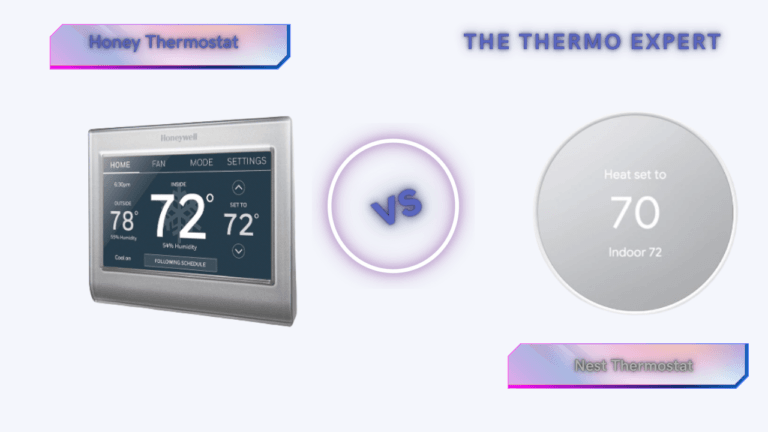
Honeywell Thermostat vs. Nest: The Ultimate 2026 Smart Home Showdown
In 2026, the smart home is no longer a futuristic concept reserved for tech enthusiasts; it is the standard for residential efficiency. At the heart of this ecosystem lies the smart thermostat. Far more than a simple dial on the wall, modern thermostats are sophisticated energy management computers that process complex data regarding local weather patterns, your home’s thermal retention properties, and your family’s unique lifestyle habits. Understanding the key features to compare when buying a smart thermostat is the first step in this journey.
As utility rates continue to fluctuate and the push for greener living intensifies, the decision between the two titans of the industry—Google Nest and Honeywell Home (Resideo)—has never been more critical. This rivalry represents a clash of two distinct philosophies. Google Nest approaches climate control from a Silicon Valley perspective: software-first, algorithm-heavy, and deeply integrated into the “Assistant” lifestyle. Their goal is to make the technology invisible, automating your comfort so you never have to think about it. For a broader look at how this compares to static setups, explore the debate on smart vs. programmable AI learning vs. schedule efficiency.
Conversely, Honeywell Home approaches the problem from a century of HVAC engineering dominance. Their perspective is hardware-first, prioritizing granular control, system reliability, and sensor precision. They understand that a thermostat isn’t just a gadget; it’s a switch for a machine that costs thousands of dollars. While Nest tries to predict what you want, Honeywell gives you the tools to command exactly what you need. This can mean the difference between a comfortable home and one that’s always a few degrees off, a topic we cover in our guide on always feeling cold at home.
This comprehensive guide goes beyond the marketing fluff. We are diving into the wiring, the algorithms, and the long-term reliability to help you decide which system deserves a spot on your wall this year.
The Quick Verdict: Which One Should You Buy?
If you are looking for the bottom line, here is the breakdown based on thousands of hours of user testing and installation data.
For the “Set It and Forget It” Homeowner:
If you live in a home with a standard HVAC setup (furnace and AC) and you want a device that looks beautiful and manages itself, the Google Nest Learning Thermostat is the undisputed king. Its ability to learn your schedule without manual programming is unmatched in the industry. It is perfect for users who want to save money on energy bills but don’t want to micromanage their settings. The “Leaf” eco-indicator gamifies energy savings in a way that genuinely changes user behavior over time. This aligns perfectly with the automotive concept of “set it and forget it” seen in comparisons of the 180 vs. 195 thermostat.
For the Control Freak & Complex System Owner:
If your home has a complex heating system (multi-stage heat pumps, dual-fuel systems, whole-home humidifiers, or ventilators) or if you struggle with rooms that are always too hot or too cold, Honeywell Home (specifically the T9 or T10 Pro) is superior. Honeywell prioritizes “RedLINK” range and sensor accuracy over flashy UI. It allows you to prioritize specific rooms at specific times—like keeping the baby’s room at 72°F during nap time regardless of the temperature in the hallway—with a reliability that Nest’s sensors occasionally lack. This granular control is essential for complex setups, much like understanding the risks of a 160 thermostat.
Deep Dive: Google Nest – The Intelligent Innovator
When Nest launched in 2011, it disrupted the entire industry. By 2026, the Google Nest Learning Thermostat has matured into a polished piece of home decor that doubles as an energy-saving genius. The core philosophy here is “automation through observation.”
The “Black Box” Algorithm
Nest’s primary selling point is its learning algorithm. Unlike traditional thermostats where you program a schedule (e.g., “Heat to 70° at 6:00 AM”), Nest observes your life. For the first week, you treat it like a manual thermostat. You turn it up when you wake up, down when you leave, and adjust it before bed. Nest records these inputs, correlates them with the time of day and outdoor weather, and builds a schedule for you. It continues to refine this indefinitely. If you start waking up earlier on Tuesdays, Nest notices the pattern and shifts the heating cycle accordingly. This adaptive behavior is the core of modern thermostat adaptive learning.
Farsight and Sensing Technology
The hardware inside a Nest unit is impressive. It utilizes “Farsight” technology, which wakes the screen when it detects you across the room, displaying the temperature, weather, or time in a large, readable font. More importantly, it uses a combination of near-field and far-field activity sensors to determine occupancy. This powers the “Home/Away Assist,” which is arguably the most aggressive energy-saving feature on the market. If Nest doesn’t detect motion for a set period and your phone’s geolocation shows you are away, it immediately shifts to “Eco Mode,” preventing you from heating an empty house. This is the grand culmination of the thermostat home/away feature concept.
Deep Dive: Honeywell Home – The HVAC Expert
Honeywell (now under the Resideo brand for consumer products) treats the thermostat as an industrial control unit. Their T-Series, specifically the T9 and T10 Pro, strips away the glass-and-aluminum glamour of the Nest in favor of a utilitarian, high-performance interface. The focus here is on predictability and connectivity reliability. For a direct spec comparison, see our Honeywell Home T9 vs T10 Pro analysis.
RedLINK and Sensor Superiority
While Nest uses standard Wi-Fi or Bluetooth for its sensors, high-end Honeywell units utilize a proprietary frequency called RedLINK. This low-frequency signal punches through concrete walls and spans large homes much better than standard Wi-Fi. This allows Honeywell’s Smart Room Sensors to maintain rock-solid connections even in basements or attics. To understand the underlying tech, your device relies on thermistors for temperature sensing.
Honeywell’s approach to sensors is also fundamentally different. You can configure the thermostat to run off a specific sensor or an average of selected sensors. For example, during the day, you might have the system average the temperature of the Living Room and Kitchen. At night, you can tell the system to ignore the downstairs sensors entirely and only maintain the temperature based on the Master Bedroom sensor. This ensures you sleep comfortably, even if the rest of the house drifts in temperature. This is the philosophy of thermostat remote sensors in action.
Handling Complex HVAC Equipment
This is where Honeywell wins the hearts of HVAC technicians. Modern high-efficiency systems often have multiple “stages” of heating and cooling. A 2-stage furnace runs at low power (60%) for efficiency and high power (100%) for rapid heating. Nest attempts to control these systems but often relies on “time-to-temperature” algorithms that can short-cycle equipment. Honeywell’s T10 Pro allows for professional-grade configuration of “lockouts” and stage timers. It can also manage “dual fuel” systems (e.g., a heat pump combined with a gas furnace) with extreme precision, determining the exact outdoor temperature at which it is cheaper to burn gas than to run the electric heat pump. If you have a dedicated outdoor boiler or similar, understanding the calibration of thermostatic controls is vital.
Nest vs. Honeywell: Head-to-Head Comparison
To help you visualize the differences, we have broken down the capabilities into the categories that matter most to homeowners.
| Feature Category | Google Nest Learning (v4/Gen 3) | Honeywell Home T9 / T10 Pro |
|---|---|---|
| Core Philosophy | Automation: “I will learn your habits so you don’t have to program me.” | Precision: “I will execute your exact commands for every room in the house.” |
| Installation & Wiring | Can often install without a “C-wire” (Power Stealing), though not recommended. Very DIY friendly. | Requires a C-wire for power. More complex backplate, but wider terminal support for accessories. |
| Remote Sensors | Basic temperature sensing. Good for averaging, but less configurable schedule integration. | Advanced sensing. Detects temperature, humidity, and motion. deeply integrated into scheduling profiles. |
| Aesthetics | Jewel-like glass and metal. Rotating outer ring is a joy to use. The best-looking device on the market. | Functional white plastic rectangle. Looks like a standard appliance. Touchscreen interface can collect fingerprints. |
| Geofencing | Excellent. Uses multiple phone locations + built-in motion sensors for highly accurate Home/Away status. | Good. Relies primarily on the mobile app’s location services. Can be slightly slower to react than Nest. |
| Accessory Control | Limited. Can control 1 accessory (Humidifier OR Dehumidifier OR Fan). | Superior. T10 Pro can control multiple accessories simultaneously, including ventilators (HRV/ERV). |
Top Smart Thermostats to Consider
Based on current market pricing and feature sets, these are the specific models we recommend purchasing in 2026.

Google Nest Learning Thermostat
This remains the gold standard for the average smart home. The polished metal ring interface is intuitive, and the app is arguably the best in the business for visualizing your energy usage history. If you care about interior design and want a thermostat that doubles as wall art, this is the one.
View on Amazon
Honeywell Home T9 Smart Thermostat
The T9 is the consumer-friendly version of Honeywell’s pro line. It comes bundled with a Smart Room Sensor, instantly solving the “hot upstairs / cold downstairs” dilemma. It supports dual-band Wi-Fi and features a simple, responsive touchscreen interface that anyone in the family can understand immediately.
View on Amazon
Honorable Mention: Ecobee Smart Thermostat Premium
We cannot ignore Ecobee. If you want the sensor capabilities of Honeywell but the modern design of a Nest, Ecobee sits right in the middle. It also includes a built-in air quality monitor and can act as a speaker for Siri or Alexa, making it a unique hybrid device.
View on AmazonThe Installation Gauntlet: Wiring, Power, and Compatibility
The installation process is where the rubber meets the road. Before you even remove your old thermostat from the wall, you must perform a thorough wiring audit. The most frequent source of failure for smart thermostats is an unstable power supply. The “C-wire,” or common wire, provides a continuous 24V flow from your furnace, allowing the Wi-Fi chip and bright display to operate without interruption. The Nest thermostat famously attempts to circumvent this by “power stealing”—pulsing the furnace relay momentarily to charge its internal battery without turning on the heat. While clever, this parasitic draw can confuse sensitive modern circuit boards. If you have ever encountered a situation where your thermostat clicks but the HVAC won’t start, you are likely facing a power delivery conflict or a tripped float switch in your condensate pan.
If your wall plate reveals only two wires (typically Red and White) in an older hydronic system, you are working with a millivolt or line-voltage setup. Standard smart thermostats like the Nest or T9 are not directly compatible without a relay or a dedicated transformer. This is a fundamental architectural difference, and mistaking line voltage vs. low voltage wiring can destroy the device. For homes with zoned systems using panels like the Honeywell HZ311, the upgrade path is even more intricate. Our guide on how to replace Honeywell HZ311 zone thermostats with Ecobee provides a wiring framework applicable to similar multi-zone Nest upgrades, emphasizing that you must often reconfigure the zone panel itself, not just the thermostat.
The physical installation is also a matter of ergonomics. The Honeywell T9 uses a straightforward backplate with clearly marked screw terminals that can accommodate stranded wire easily. Nest uses a proprietary connector block that clicks into place, which is sleek but can be finicky with wires that are too thick. In both cases, labeling your wires with the provided stickers before disconnecting the old unit is mandatory. A stray wire touching the wrong terminal can blow a low-voltage fuse on your furnace control board. If you finish the installation and the system is dead, our 10-minute diagnostic checklist for a faulty thermostat is the best place to start before you call a technician.
The Sensor Wars: Radar, Triangulation, and Occupancy
The battle for data supremacy is fought not on the wall but in the corners of your rooms. Nest and Honeywell take radically different approaches to sensing. The Nest Learning Thermostat relies on an integrated 60GHz Soli radar chip (in the 4th Gen) to detect precise movements. This radar can differentiate between a person walking up to the thermostat and a pet crossing the room. It folds this data into the Home/Away algorithm. The upcoming features in the Nest 4th Gen with Soli radar promise a level of presence sensing that feels like telepathy. For a deeper understanding of how sensors drive comfort, check out our comparison of Nest Auto-Schedule vs. Ecobee Smart Sensors.
Honeywell counters with a different, yet equally robust, strategy: remote sensor diversity and signal strength. The T9 and T10 Pro Smart Room Sensors detect temperature, humidity, and occupancy. The critical detail is the range. While Wi-Fi sensors are limited by router placement, Honeywell’s RedLINK protocol uses a lower frequency (typically 900MHz) that penetrates building materials with ease. In our tests, a Honeywell sensor placed in a freezer chest (to simulate an extreme cold room) in a detached garage maintained a perfect signal to a T10 Pro two floors away, where a Wi-Fi-based sensor would drop. For an Ecobee comparison on this, see Ecobee vs. Honeywell remote sensor range.
The logic of sensor prioritization is Honeywell’s killer feature. You are not just averaging rooms; you are building a schedule that shifts the “target zone” around your house. From 2-4 PM, the system can prioritize the nursery sensor. From 5-9 PM, it averages the living room and kitchen. Nest’s “Room Sense,” while improving, still tends to average sensors based on occupancy probability rather than hard, user-defined time blocks. This can lead to frustration if you prefer a specific room to be exactly 70°F at a specific minute. If you are struggling with temperature disparities between floors, our guide on Wyze vs. Ecobee for multi-story homes explores similar sensor logic issues.
Protecting the Heavy Iron: Your HVAC Hardware
A Nest or a Honeywell is a switch for a machine that may have cost you $12,000. The quality of that switch determines the longevity of your compressor, heat exchanger, and blower motor. One of the most damaging occurrences in a smart home is “short cycling,” where the compressor turns on and off rapidly. This happens when the thermostat’s temperature differential (the “swing” setting) is too tight. Nest abstracts this away; you can’t easily change the swing. Honeywell exposes this in the Installer Setup Menu as “Cycles Per Hour” (CPH). For a high-efficiency heat pump, setting this to 2 or 3 protects the compressor. If you are exploring heat pumps, you should understand the efficiency metrics: a Bosch inverter heat pump’s SEER2/HSPF2 ratings are only achievable if the thermostat complements the inverter logic.
Furthermore, the voltage stability provided by the C-wire is not just cosmetic for the display; it prevents relay chatter. A relay that flickers rapidly due to insufficient power creates micro-arcing that welds the contacts over time. This is why a thermostat battery failure causes a relay no-start—the relay physically cannot snap shut. If your heating works but your cooling doesn’t (or vice versa), you might have a stuck relay. This is similar to the automotive problem of a thermostat stuck open or closed. Just as you need to know how to tell if a car thermostat is bad, you must know the symptoms of a failing home thermostat relay.
Climate Zone Strategy: Adapting to Your Location
Your regional weather dictates which smart thermostat logic is more profitable. In northern states with brutal winters, the “Aux Heat Lockout” feature is paramount. When a heat pump enters defrost mode, it briefly engages auxiliary electric heat strips. A poorly configured thermostat might over-use these strips, leading to a $500 monthly bill. Honeywell’s advanced dual-fuel settings allow you to lock out the compressor below a specific temperature and rely solely on gas, while Nest’s “Heat Pump Balance” tries to weigh comfort against efficiency more opaquely. If you rely on a boiler, consider the best greenhouse heater solutions as an analogy for off-grid systems.
Conversely, in hot, humid climates like the Southeast, “Air Conditioning Overcool” is a secret weapon. You can configure the Honeywell T10 to overcool the house by up to 3 degrees when the humidity is high, creating dehumidification without a dedicated dehumidifier. Nest can also do this via “Cool to Dry,” but professional installers report that Honeywell’s implementation is less aggressive and less likely to make the house feel like a refrigerator. For those looking at whole-house solutions, our review of the best whole house humidifier for 2026 explains how these devices tie into the smart thermostat ecosystem.
Budget vs. Premium: The Full Spectrum of Choice
Not everyone needs a radar-powered, glass-clad device. The market has matured, and you can now get an impressive smart thermostat for under $50. Devices like the Wyze or the Amazon Smart Thermostat use simple PIR sensors and a bridge device but offer core geofencing and scheduling. Our roundup of smart thermostats under $50 covers these options, noting that you trade away the learning algorithm and premium sensors for a price point that’s 80% lower. For a specific comparison of budget devices for problem rooms, see Wyze vs. Govee for hot/cold rooms.
In the mid-range, the Ecobee3 Lite offers the simplest entry into the voice-enabled ecosystem, and the Amazon Smart Thermostat review shows what private-label quality can look like. The Sensi Touch illuminated terminals solve the dark-basement installation headache. For those with Apple HomeKit, ensuring HomeKit thermostat automation with geofencing scenes is vital. If you are a landlord, you need a device with landlord thermostat lockouts to prevent tenants from setting heat to 90°F. The 2026 guide to battery-powered smart thermostats is useful for homes without a C-wire.
The UK and European markets have their own champions, led by Hive, Tado, and Drayton Wiser. These systems are often tailored for combi-boilers rather than forced-air furnaces. The UK smart thermostat ranking 2026 breaks down how these compare. If you have a system boiler with a hot water cylinder, the Hive Active Heating V3 installation checklist is mandatory reading. The rise of radiator-based zoning via Tado radiator valves and Drayton Wiser DIY zoning shows the European approach, which parallels the Honeywell Evohome 12-zone local zoning philosophy. For a comparison of the two major UK automation players, see our Hive vs. Tado geofencing analysis. And to understand the communication protocol that makes these efficient, read about Nest, Hive, Tado OpenTherm.
Calculating Your Return on Investment
Smart thermostats easily cost $150–$300. Can they pay for themselves? The math depends on your local utility rates and your commitment to the features. A geofencing system that turns off the AC when you leave for work can save up to 10% on your annual heating and cooling costs. Use our WiFi thermostat ROI payback calculator to run your own numbers. The thermodynamic ROI metrics for Nest geofencing specifically show how the software manages to not just turn off, but pre-cool the house using low-cost electricity.
Energy companies are heavily invested in this transition. 2026 smart thermostat rebates can often cut the cost of a high-end Honeywell in half if you sign up for a “Demand Response” program. This is where the utility company slightly adjusts your temperature during peak grid load. If you participate, the Ecobee3 Lite with Eco+ Time-of-Use feature automates this beautifully, avoiding peak rates. The real savings come from cutting HVAC runtime via geofencing and using a winter thermostat schedule of 68°F.
Troubleshooting: The “It’s Not Working” Compendium
Even the best technology fails. The good news is that most failures are related to power or configuration, not defective hardware. If your thermostat will not start your furnace, check the reasons why a thermostat won’t start a furnace, which often points to a tripped safety switch. If the furnace won’t turn on but the fan works, you likely have a fuel supply or igniter issue. If you notice your thermostat is not charging, the C-wire is likely disconnected or a ribbon cable is loose.
One annoying bug is a thermostat that keeps turning on the AC randomly; this often stems from a faulty “Auto” changeover logic or the thermostat showing the wrong room temperature due to a draft from the wall cavity. A cold draft through the wire hole tricks the sensor. A thermostat switching from heat to cool indicates a software conflict. If the screen is blank, you might need to replace the battery in a Honeywell thermostat. If the display fades and relays click, it’s a low battery with a fading display relay issue.
Often, the problem isn’t heat at all, but connectivity. The “Sensi Connected but not Sensi Cloud” error is a notorious firmware handshake failure detailed in our Sensi cloud fix guide. If your smart thermostat reboots and your AC turns on during voltage drop, it’s the transformer load issue common with Nest power stealing. If you see a heat-on signal with no heat, the 24V command is hitting a dead end. For a systematic, flowchart-style approach, use our guide for when the thermostat is not reaching set temperature. Finally, if all else fails, a factory reset is needed; learn the Honeywell reset without a reset button and general Honeywell reset procedures.
The Aesthetic and Design Integration Layer
A significant and often unexamined part of the Nest vs. Honeywell debate is simply how these devices make you feel about your home. The Nest Learning Thermostat, with its crisp rotating ring and jewel-like glass, invites interaction. It says, “I am modern technology, and I am beautiful.” The Honeywell T9, a white plastic rectangle, says, “I am a tool, and I work.” This is not a trivial difference. If a thermostat is ugly, family members won’t interact with it, defeating the purpose of smart data input. If you are struggling to make a thermostat fit your decor, see our 25 thermostat cover ideas and our analysis of the best wall color behind a thermostat. To physically clean up the wires, we show you how to hide thermostat wires.
The Art of Reading Your Thermostat Data
Once installed, you must understand the data. How to read a thermostat involves more than just the number; it’s understanding the schedule indicators, the “cycle” messages, and the error codes. If you have a heat pump, “Aux Heat” is a yellow triangle warning. If you see it often, your heat pump is failing or your heat load calculation is off. Knowing how to adjust a Honeywell thermostat beyond the basic temperature is key to accessing these hidden menus. And if you want to manually optimize settings across seasons, see our comparison of thermostat schedule vs. learning.
The Matter Protocol and Cross-Platform Compatibility
By 2026, Matter is supposed to unify the smart home. Both Nest and Honeywell support the Matter standard, allowing you to control the device via Apple Home, Amazon Alexa, and Google Home from a single unified interface. However, support for advanced “Hunches” and “Routines” still favors the native ecosystem. Nest with Alexa Hunches is a powerful proactive automation, but the API handshake occasionally breaks. Pairing devices like the Ideal Halo thermostat requires specific steps that are generic to most Zigbee/Thread setups. The physical network layer is also varied: some sensors use smart thermostat connectivity via Thread, others via Bluetooth, so verifying your thermostat’s compatibility with your furnace is essential.
Longevity, Durability, and Service Life
How long do these devices last? A dumb thermostat can last 40 years. A smart thermostat has a screen, Wi-Fi chip, and internal battery that degrade. Based on data, Honeywell thermostats last about 10-15 years. Nest units from the 2nd generation are beginning to show Wi-Fi fatigue, requiring frequent reboots. The planned obsolescence is mitigated by the software’s ability to update and fix bugs, but eventually, the hardware fails. You’ll know this time has come when you start seeing the 12 symptoms of a bad thermostat. Knowing how to know if you need a new thermostat saves you from chasing ghost symptoms, like a bad thermostat causing AC not to cool or a bad thermostat causing the heater not to work. The core functionality often aligns with whether you have an incompatible unit: how heating and cooling thermostats differ is a fundamental lesson—a cooling-only thermostat will not fire a furnace. The general thermostat wiring guide is the Bible here.
The Automotive Crossover: Engine Cooling Philosophy
The principles of home thermostat management echo loudly in the automotive world. A car’s thermostat (160°F, 180°F, or 195°F) controls the minimum operating temperature, exactly like your home’s setpoint, but with even higher stakes. The choice between a plastic vs. aluminum thermostat housing mirrors the build quality of your wall unit. Understanding the mechanics of a car’s wax pellet valve is like understanding the PID logic of a smart thermostat. When things go wrong, you need the generic reset process.
The Ultimate Energy Saving Playbook
To close the loop on savings, you must implement an integrated strategy. A smart thermostat with geofencing saves energy by default. You can amplify this with strategies to cut HVAC runtime and geofencing GPS radius optimization. General HVAC energy efficiency tips, winter vacation settings, and the science of a sleep temperature of 65°F all contribute to lower bills. The smart thermostat provides improved home safety through freeze alerts. Finally, when the unit becomes obsolete, you may face a full HVAC system replacement, including furnace replacement and AC unit installation cost.
Frequently Asked Questions & Troubleshooting
We have compiled the most technical and frequent questions users ask when upgrading from a “dumb” thermostat to a smart system.
Do I absolutely need a C-wire (Common Wire)?
Technically, the Nest Learning Thermostat claims to work without one by “power stealing” (pulsing the HVAC system to charge its battery). However, as professionals, we strongly advise against this. Without a C-wire, your thermostat may disconnect from Wi-Fi during heating cycles, or worse, it can cause sensitive furnace control boards to chatter or burn out. Honeywell requires a C-wire. If you don’t have one, use a “C-wire adapter kit” (often included with the T9) to repurpose your existing wiring safely.
I have a Heat Pump with Auxiliary Heat. Which is better?
Both thermostats handle heat pumps, but Honeywell (especially the T10 Pro) offers more granular control over the “balance point.” This is the outdoor temperature at which the thermostat switches from the efficient heat pump to the expensive auxiliary heat (electric strips or gas). Precisely tuning this setting can save you hundreds of dollars a winter. Nest automates this via “Heat Pump Balance,” which is easier but offers less manual fine-tuning.
Can these thermostats measure humidity?
Yes, both the Google Nest and Honeywell T-series have built-in hygrometers to measure indoor relative humidity. However, simply measuring it is different from controlling it. If you have a whole-home humidifier attached to your furnace, the Honeywell T10 is significantly better at managing it, allowing for “Window Protection” modes that lower humidity when it’s freezing outside to prevent condensation on glass.
What happens if my Wi-Fi goes down?
Your smart thermostat will continue to function as a standard thermostat. It will maintain the last schedule or temperature setpoint it received. You will lose the ability to control it from your phone, and features like Geofencing will stop working, but your pipes will not freeze, and your house will not overheat. The core HVAC control logic is stored locally on the device.
Final Thoughts: Assessing Your Smart Home DNA
Ultimately, the battle between Honeywell and Nest is not about which device is “better” in a vacuum; it is about which device aligns with your specific needs as a homeowner. We are seeing a divergence in the market where “Smart Home” is splitting into “Automated Lifestyle” vs. “Connected Utilities.”
Choose the Google Nest Learning Thermostat if:
- You value aesthetics and want a device that feels like a premium piece of modern art.
- You have an unpredictable schedule and want an algorithm to manage your savings automatically.
- You are deeply invested in the Google Assistant / Android ecosystem.
- You have a standard single-stage or two-stage HVAC system.
Choose the Honeywell Home T9/T10 if:
- You have specific rooms that are uncomfortable and need a sensor-based solution to fix airflow issues.
- You have a complex HVAC system (Variable speed, Communicating, Dual-Fuel) and need professional-grade control logic.
- You prefer a static, predictable schedule over a learning algorithm that changes on its own.
- You want the most reliable connection possible via RedLINK technology.
Before you buy, always pop the cover off your old thermostat and take a picture of the wiring. Use the compatibility checkers on both the Google and Honeywell websites. When in doubt, consulting a qualified HVAC technician is a small investment that prevents costly damage to your home’s heating and cooling equipment.

About the Author
Alex Carter is a Senior Full-Stack Developer and Home Technology Consultant with over 12 years of experience. He specializes in IoT integration and has installed over 200 smart thermostats across varied residential environments. His work focuses on bridging the gap between legacy HVAC infrastructure and modern software automation.





 Home
Home
 Info
Info
 Compare
 Reviews
 Shop
Shop